
PHOT-310 · Lesson 7 of 12 · 30 min
E-commerce photography workflows
E-commerce photography is the largest single market for product images. Every product sold online needs images, usually several per product, often in many colors, and online retailers add new products constantly. Unlike advertising, where a single image might justify a day of work, e-commerce is about systems: producing large numbers of accurate, consistent images at a predictable cost and speed. Shoppers cannot touch the product, so images do the work of the shop floor, and their accuracy directly affects sales and returns. This lesson explains marketplace and platform image requirements, the main types of e-commerce images, how high-volume studios build workflows from product intake to delivery, the techniques of white backgrounds, consistency and apparel, 360-degree imagery, quality control, accessibility and the economics of e-commerce photography.
Why e-commerce images matter
Retailers consistently report that product images are among the most important factors in an online purchase decision. Images show what the product looks like, its size, its material and how it is used. Inaccurate images, especially in color, size or detail, are a common reason for returns, which are expensive for retailers and harmful to the environment. Good e-commerce photography therefore balances appeal with accuracy: the product should look its best, but the customer should receive exactly what they saw.
Consistency matters too. A category page showing 40 products in a grid looks professional when every product is photographed at the same angle, scale, lighting and background. Inconsistent images make a store look disorganized and make products harder to compare.
Marketplace and platform requirements
Marketplaces and e-commerce platforms set rules for product images. These change from time to time and vary by category and country, so always check the current guidelines for each platform before a job. Typical requirements look like this:
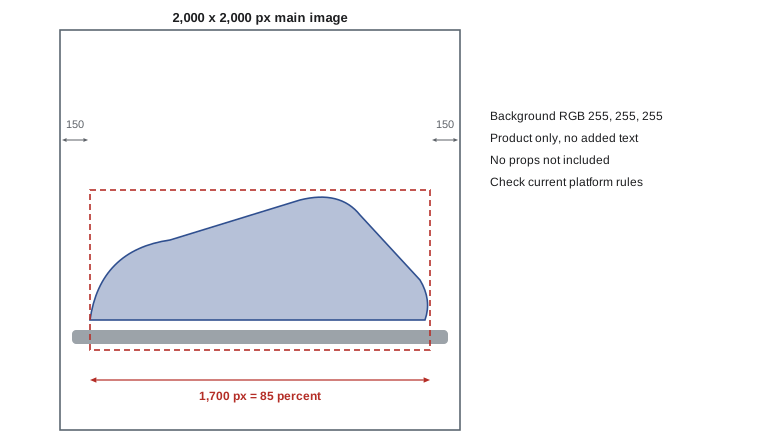
- Amazon's main image (the first image shown in search results) must show the product on a pure white background (RGB 255, 255, 255), with the product filling about 85 percent or more of the frame, without added text, logos, watermarks, borders or props that are not included with the product. Images of at least 1,000 pixels on the longest side are recommended so that customers can zoom; larger files are common. Additional images can show the product in use, details, scale and infographics. Some categories, such as apparel and jewelry, have extra rules about mannequins, models and accessories.
- Shopify stores are more flexible because the store owner controls the design, but Shopify recommends square images of around 2,048 × 2,048 pixels for product images, accepts images up to about 4,472 × 4,472 pixels (20 megapixels) and 20 MB, and resizes images automatically for different devices. Consistent aspect ratios across a store are important for clean grids.
- Other marketplaces and retailers, such as Etsy, eBay, Walmart, Canadian and US department stores and wholesale portals, each publish their own specifications for size, background, aspect ratio, file type and naming.
Many retailers also publish a photography style guide for brands that supply images, specifying angles, background color, shadow style, margins, the number of images per product and file naming conventions. A brand supplying several retailers may need different crops and backgrounds for each, so a single master image is often shot with enough margin and resolution to produce every required version.
Worked problem
Sizing the product in a marketplace image
A retailer requires square 2,000 × 2,000 pixel images with the product's longest dimension filling 85 percent of the frame. A camera produces 6,000 × 4,000 pixel files. If the product is photographed in landscape and fills 70 percent of the frame height, is there enough resolution?
Show solution
- Required product size in the final image: 0.85 × 2,000 = 1,700 pixels.
- Product size in the capture: 0.70 × 4,000 = 2,800 pixels.
- 2,800 ≥ 1,700, so the product can be scaled down to 1,700 pixels with no upsampling.
- The square crop needs 1,700 / 0.85 = 2,000 pixels of capture per 1,700 pixels of product; at capture scale, 2,800 / 0.85 ≈ 3,294 pixels square, which fits within the 4,000-pixel height.
Answer: Yes. The product is 2,800 pixels in the capture, more than the 1,700 required, and a square of about 3,294 pixels around it fits within the frame. The file is cropped square and downsampled to 2,000 pixels.
Types of e-commerce images
A complete product listing usually includes several kinds of images:
- Main or hero image on white: the product alone, at the standard angle.
- Alternative angles: front, back, side, three-quarter, top, bottom and interior views, according to the category.
- Detail images: close-ups of materials, textures, stitching, ports, buttons, labels and features.
- Scale and in-context images: the product held, worn, placed in a room or next to familiar objects so that customers can judge size.
- Lifestyle images: the product in use in an attractive setting, covered in lesson 9.
- Infographic and annotated images: images with text callouts, dimensions or features, usually created by designers from clean product photographs.
- Variant images: every color or finish, photographed identically so that customers can switch between them.
- 360-degree spins and video: interactive rotations and short product videos.
For apparel, additional types include on-model images, flat lays, ghost mannequin images that show garments in three-dimensional shape without a visible mannequin, and detail shots of fabric and fit.
The high-volume workflow
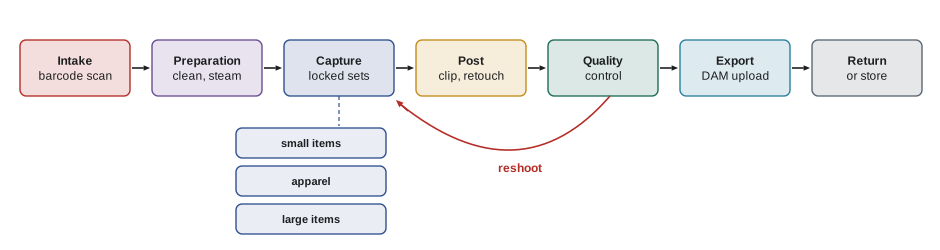
High-volume e-commerce studios work like production lines. Each step is defined so that products flow through the studio with minimal handling and errors.
- Intake: products arrive with a list of SKUs and required images. Each item is scanned by barcode, checked against the list, inspected for damage and assigned to a set.
- Preparation: products are unpacked, steamed or pressed (apparel), cleaned, de-dusted and prepared with stuffing, tissue or supports. Labels and tags may be removed or hidden.
- Capture: products are photographed on dedicated sets with locked lighting templates, camera positions and capture settings. File names are generated automatically from the scanned barcode, the SKU and the view number.
- Post-production: images are cropped, aligned, background-cleaned or clipped, color-corrected and retouched to a defined level, often by an in-house team or an outsourced retouching service.
- Quality control: images are checked against the style guide, the shot list and the physical product for accuracy.
- Export and delivery: images are exported to all required sizes, formats and naming conventions and uploaded to the retailer's digital asset management (DAM) system or product information management (PIM) system.
- Return or storage: products are repacked and returned or stored.
File naming is critical. A single mistake in matching an image to the wrong SKU can put the wrong product on a web page. Many studios use barcode scanners and tethering software that name files at capture, such as SKU_view_sequence, for example 220734-BLK_02.jpg for the second view of a black variant. Consistent naming also allows automated processing and upload.
Lighting templates and consistency
The heart of e-commerce consistency is the lighting template: a fixed arrangement of lights, camera position, focal length, aperture and settings for each product category. Templates are developed and tested, documented with diagrams, measurements and photographs, and then locked. Any photographer on any day should be able to produce identical images. Typical templates include a small products set, a footwear set, an apparel on-model set, a flat-lay set and a large items set.
Consistency extends to camera angle and scale. Many retailers specify a standard camera height and angle for each category, such as footwear photographed in profile with the toe facing left. Products of different sizes may be shown at consistent relative scale or each filling the frame, depending on the style guide. Crop and alignment templates in post-production ensure that products sit at the same position in every frame.
White backgrounds can be produced in several ways. The background can be lit about one to one and a half stops brighter than the product so that it clips to pure white in camera, with flags preventing flare. Alternatively, products can be photographed on a light gray background and clipped (cut out with a path or mask) in post-production, then placed on pure white with a consistent artificial shadow. In-camera white is faster for high volume; clipping gives more control over edges and shadows. Automated background removal software has made clipping much faster, but it still needs checking around fine edges such as hair, fur, mesh and transparent parts.
Apparel techniques
Clothing is one of the largest e-commerce categories and has its own techniques:
- On-model: models wear the garments, photographed against a plain background with consistent poses, usually full-length and close-up. Fit and drape are visible, but models add cost and scheduling.
- Ghost mannequin (invisible mannequin): garments are photographed on a mannequin, then the mannequin is removed in post-production, often by combining a second image of the inside back of the garment, so that the garment appears to float in a three-dimensional shape.
- Flat lay: garments are arranged flat on a surface and photographed from above. Fast and cheap, but shape and fit are less clear.
- Detail shots: fabric texture, buttons, zips, stitching and labels.
Color accuracy is especially important for apparel because color mismatches are a leading cause of returns. Profiles built from a color target shot under the set's lighting, calibrated displays and comparison with the physical garment under standard viewing light are essential (see PHOT-301).
360-degree photography
360-degree spins let customers rotate a product. The product sits on a motorized turntable that rotates in fixed steps while the camera captures a frame at each step. The frames are then assembled into an interactive viewer. More frames give a smoother rotation but larger files and more processing.
Worked problem
Planning a 360 spin
A client wants a smooth 360-degree spin of a sneaker. Their viewer works well with 36 frames per rotation, and they want two rows: one at camera height and one from 30 degrees above. Each frame takes 4 seconds including turntable movement and capture. Each final frame is 1,500 × 1,500 pixels at about 400 KB. How long does capture take, and how large is the spin?
Show solution
- Angle step: 360° / 36 = 10° per frame.
- Frames: 2 rows × 36 = 72 frames.
- Capture time: 72 × 4 s = 288 s, about 5 minutes, plus setup and camera repositioning.
- Size: 72 × 400 KB ≈ 28.8 MB for the full-resolution set; viewers usually load reduced sizes progressively.
Answer: 10° steps, 72 frames, about 5 minutes of capture and about 29 MB of finished frames. Post-production, especially cleaning and aligning each frame, will take longer than capture.
Quality control and returns
Quality control checks every image against defined criteria before delivery: correct SKU and file name, correct angle and crop, correct background value, no dust, lint, scratches or fingerprints, accurate color against the physical product and the color target, consistent shadow and alignment, and no visible supports, tags or retouching errors. Studios use checklists and second-person review. Retailers often track return reasons; a spike in 'not as pictured' returns for a product line is a signal to review the photography.
Accessibility
Product images must be usable by customers with disabilities. Alternative text (alt text) describing each image helps screen reader users understand products, and images containing text, such as infographics, need that information available as text. Photographers and studios often supply descriptive metadata that the retailer uses to write alt text.
In the United States, courts have often applied the Americans with Disabilities Act (ADA) to commercial websites, and many retailers have faced lawsuits over inaccessible sites, including missing alt text. The Web Content Accessibility Guidelines (WCAG) 2.1 Level AA are widely used as the practical standard, and a 2024 Department of Justice rule adopted WCAG 2.1 AA for state and local government websites.
The economics of e-commerce photography
E-commerce photography is usually priced per image, per product or per day, and margins depend on throughput. A studio's costs include rent, equipment, staff, software, retouching and overheads. Knowing the cost per image is essential for quoting profitably.
Worked problem
Cost per image
A small e-commerce studio costs $1,800 a day to run (staff, rent, equipment, software and overheads). It photographs 100 products a day with 4 images each. Outsourced retouching costs $1.20 per image. What is the cost per image and the price per image for a 35 percent margin on price?
Show solution
- Images per day: 100 × 4 = 400.
- Studio cost per image: $1,800 / 400 = $4.50.
- Total cost per image: $4.50 + $1.20 = $5.70.
- Price for 35 percent margin on price: $5.70 / (1 − 0.35) ≈ $8.77.
Answer: About $5.70 per image in cost, priced at about $8.77 per image for a 35 percent margin. If throughput falls to 300 images a day, cost rises to $7.20 per image, so realistic throughput estimates are vital.
Common mistakes
MistakeAssuming every marketplace has the same image rules.
InsteadCheck each platform's current guidelines and the retailer's style guide.
MistakeNaming files by hand after the shoot.
InsteadName files at capture from scanned barcodes and SKUs.
MistakeLetting templates drift from day to day.
InsteadDocument and lock lighting, camera and capture settings.
MistakeTrusting automatic background removal without checking.
InsteadInspect fine edges, mesh, hair and transparent parts.
MistakeIgnoring color accuracy for apparel.
InsteadProfile, calibrate and compare with the physical product.
Summary and key terms
- E-commerce images drive purchase decisions and affect return rates.
- Platforms set rules for background, frame fill, size and content that change over time.
- Listings combine main images, angles, details, scale, lifestyle, infographics and variants.
- High-volume studios run defined pipelines from intake to DAM upload.
- Locked lighting templates and alignment templates create consistency.
- Apparel uses on-model, ghost mannequin and flat-lay techniques.
- Cost per image depends on throughput, and accessibility requires good alt text.
- Main image
- The first image shown for a product, usually on white.
- Frame fill
- The percentage of the frame occupied by the product.
- Lighting template
- A documented, fixed lighting and camera setup for a category.
- Clipping path
- A vector outline used to separate a product from its background.
- Ghost mannequin
- A technique removing the mannequin so garments appear to float.
- DAM
- Digital asset management system for storing and distributing images.
- PIM
- Product information management system for product data.
- 360 spin
- An interactive rotation built from frames at fixed angle steps.
- Alt text
- Text describing an image for screen reader users.
- WCAG
- Web Content Accessibility Guidelines.
Practice problems
Work each problem on paper first, then reveal the answer to check.
What background value does Amazon require for main images?
Show answer
Pure white, RGB 255, 255, 255.
Roughly how much of the frame should the product fill on Amazon?
Show answer
About 85 percent or more.
What size does Shopify recommend for square product images?
Show answer
About 2,048 × 2,048 pixels.
85 percent fill in a 1,600 px square?
Show answer
1,360 px.
Angle step for a 24-frame spin?
Show answer
15°.
Why name files at capture?
Show answer
To prevent mismatching images and SKUs.
What is a ghost mannequin image?
Show answer
A garment shown in 3D shape without a visible mannequin.
Cost per image for $2,000 a day and 500 images?
Show answer
$4.00.
Price for 40 percent margin on a $6 cost?
Show answer
$10.00.
Why does color accuracy matter for apparel?
Show answer
Color mismatch causes returns.
Lesson quiz · 5 questions
Score 60% or more to complete this lesson.
Create a free account to save your progress, take quizzes and earn a certificate.