
PHOT-440 · Lesson 2 of 12 · 32 min
Camera settings for video
A stills shooter can walk into a job with the camera on aperture priority and auto ISO and come away with good pictures. Video punishes that approach. Automatic settings change during a shot, so brightness pumps up and down, white balance drifts as people walk past windows, and autofocus hunts. Most professional video is shot with exposure, white balance and often focus under manual or carefully limited control. This lesson covers the settings menu of a typical hybrid camera from a photographer's point of view: frame rate, shutter, ISO, resolution, codec, bit depth, chroma subsampling, picture profiles and white balance. CINE-201 explains the underlying sensor and codec engineering in more depth; here the goal is to choose sensible settings quickly and consistently for client work.
Frame rate: the first decision
Frame rate is the number of images recorded per second. It affects the look of motion, the options for slow motion and the compatibility of footage with other material. The common choices are 24 frames per second (strictly 23.976 in most cameras), 30 (29.97), and 60 (59.94), with 25 and 50 used in regions with 50 Hz power such as Europe. Canada and the United States both use 60 Hz mains electricity and share the NTSC-derived rates, so 24, 30 and 60 are the normal choices for North American client work.
Twenty-four frames per second gives the familiar cinematic look of feature films; thirty gives the slightly smoother look of television news and much online video; sixty gives very smooth motion that suits sports and fast action but can look like video games or soap operas when played back at normal speed. The rule that matters most is consistency: pick one base rate for a project and shoot everything at that rate or at a higher rate intended for slow motion. Mixing 24 and 30 in one timeline causes stutter when the editing software converts one to the other.
| Frame rate (fps) | Typical use | Notes |
|---|---|---|
| 23.976 (24) | Brand films, weddings, short documentaries | Cinematic motion; most common choice for client films |
| 29.97 (30) | Corporate, social, broadcast-style content | Smoother motion; common for live events and screen recordings |
| 59.94 (60) | Sport, action, slow motion at 2.5x when conformed to 24 | Very smooth if played at normal speed |
| 119.88 (120) | Slow motion at 5x in a 24 fps timeline | Often limited to HD or cropped 4K; needs more light |
| 25 and 50 | Projects for 50 Hz regions | Avoid in North America unless the client requires them |
Slow motion by conforming
Slow motion is made by recording at a higher frame rate and playing the frames back at the project rate. If you record at 120 frames per second and place the clip in a 24 frames per second timeline, each second of real action becomes five seconds on screen. The slow-down factor is the ratio of capture rate to playback rate.
Worked problem
How long will a slow-motion clip last on screen?
You record 6 seconds of confetti falling at 120 fps for a 24 fps wedding film. How long does the clip last on screen if conformed, and what shutter speed should you use while recording?
Show solution
- Slow-down factor: \( 120 / 24 = 5 \).
- Screen time: \( 6 \times 5 = 30 \) seconds, far more than an editor will use, so you can choose the best 3 to 5 seconds.
- Shutter speed follows the capture rate, not the timeline rate: \( 1/(2 \times 120) = 1/240 \), so use 1/250 second.
Answer: The clip lasts 30 seconds on screen. Record at 1/250 second, and plan for about 2.3 stops more light than you needed at 24 fps with a 1/50 shutter, because \( \log_2(250/50) \approx 2.3 \).
Shutter speed and the 180-degree rule
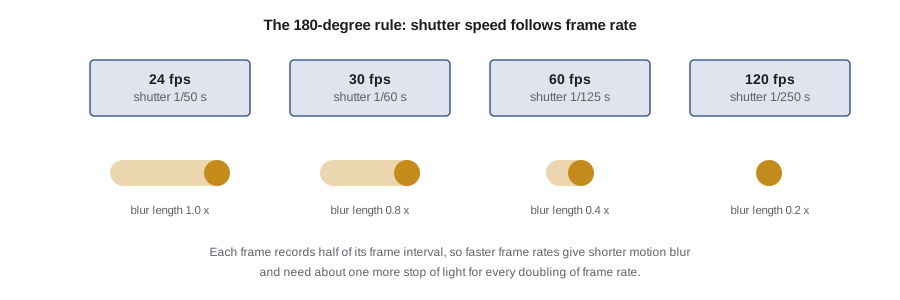
In film cameras a rotating shutter disc was open for part of each frame. A disc open for half its rotation, 180 degrees, gives an exposure of half the frame interval, and audiences have watched that amount of motion blur for a century. The digital equivalent is the 180-degree rule: set the shutter speed to approximately one divided by twice the frame rate.
At 24 fps this gives 1/48 second, rounded to 1/50 on most cameras; at 30 fps it gives 1/60; at 60 fps 1/120 or 1/125. A faster shutter produces crisp, staccato motion with less blur, as seen in some battle scenes and music videos; a slower shutter produces smeared, dreamy motion. Both can be deliberate creative choices, but for client work stay near 180 degrees unless you have a reason not to. The main exception in North America is flicker: under some 60 Hz lighting, 1/50 second can show banding, and 1/60 at 24 fps (a 144-degree shutter) is a common fix. Lesson 6 explains flicker.
fps_list = [24, 30, 60, 120]
for fps in fps_list:
    ideal = 1 / (2 * fps)
    print(f'{fps:3d} fps: ideal 1/{round(1 / ideal)} s')
for fps, shutter in [(24, 50), (24, 60), (30, 60), (24, 125)]:
    angle = 360 * fps / shutter
print(f'{fps} fps at 1/{shutter}: {angle:.0f} degree shutter')24 fps: ideal 1/48 s 30 fps: ideal 1/60 s 60 fps: ideal 1/120 s 120 fps: ideal 1/240 s 24 fps at 1/50: 173 degree shutter 24 fps at 1/60: 144 degree shutter 30 fps at 1/60: 180 degree shutter 24 fps at 1/125: 69 degree shutter
Controlling exposure without the shutter
Because shutter speed is now mostly fixed, brightness has to be controlled with aperture, ISO and neutral density filters. Outdoors in daylight this is a real problem: at 1/50 second and f/2.8, a bright sunny scene is several stops overexposed even at the lowest ISO. This is why ND filters are essential for video. A variable ND lets you adjust in one turn; fixed NDs give better image quality and color but take longer to change. Some cameras and many cinema cameras have built-in ND filters. Lesson 3 includes ND calculations.
ISO behaves as it does in stills, with one twist. Many cameras have a minimum or base ISO for log profiles, often ISO 400, 640 or 800, because the log curve places middle gray lower and needs more gain to use the sensor's full range. Some cameras also have dual native ISO, with two analog gain circuits, so noise is similar at, say, ISO 800 and ISO 4000. Learn your camera's base ISOs and use them in preference to in-between values when possible.
Resolution and sensor modes
Most client work is delivered in HD (1920 by 1080) or UHD 4K (3840 by 2160), and vertical social clips at 1080 by 1920. Shooting 4K for an HD delivery gives room to reframe, stabilize and crop in post; shooting 4K for 4K delivery gives none. Cameras differ in how they produce 4K. The best modes read the whole sensor width and downsample (oversample) from 5K, 6K or more, which gives sharp, low-noise images. Other modes skip lines, which can cause aliasing and moiré, or crop the sensor, which changes your effective focal length. Open-gate modes record the full sensor height, often 3:2, which is useful when you need both horizontal and vertical versions from one shot.
Check your camera's specification sheet for which modes are oversampled, which are cropped and which cause rolling shutter. Rolling shutter is the skew that occurs because most sensors read lines from top to bottom over several milliseconds; fast pans make vertical lines lean. Faster readout reduces the effect, and global-shutter sensors eliminate it.
Codecs, compression and bitrate
A codec is the method the camera uses to compress video. Three families matter to hybrid shooters. Long-GOP codecs such as H.264 (AVC) and H.265 (HEVC) store full frames only every so often and record the differences in between, giving small files that are harder for computers to edit. Intra-frame codecs, labeled All-I or Intra, compress each frame separately, giving larger files that edit more smoothly. Professional intermediate codecs such as Apple ProRes are intra-frame with high quality and wide software support. Raw video formats such as ProRes RAW, Blackmagic RAW and various manufacturer raw formats record sensor data with minimal processing, which gives the most latitude for grading at the cost of large files and slower workflows.
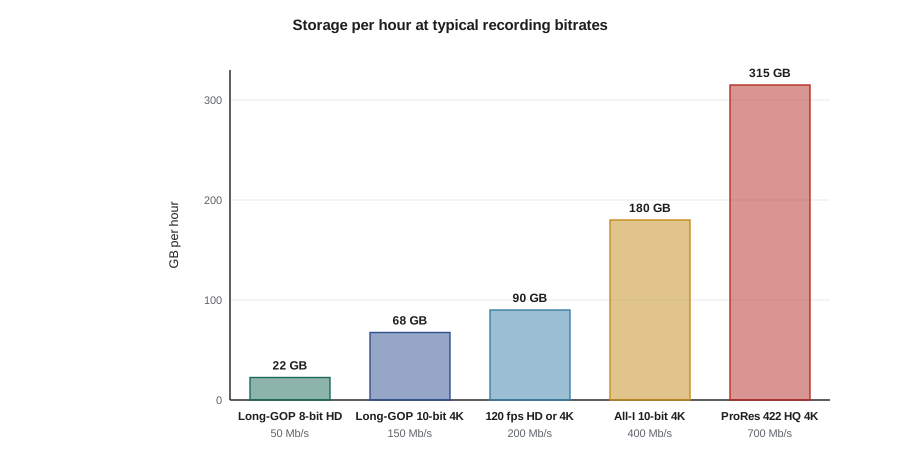
Bitrate, measured in megabits per second (Mb/s), is the amount of data recorded each second. Higher bitrates preserve more detail in difficult scenes such as foliage, water, confetti and smoke. Bitrate also drives storage and card speed requirements, which are easy to underestimate.
Worked problem
How much storage does a shoot day need?
You plan to record about 3 hours of footage in a 10-bit 4:2:2 Long-GOP codec at 150 Mb/s, plus 20 minutes of 120 fps slow motion at 200 Mb/s. How much storage do you need, and what is the minimum card speed?
Show solution
- Main footage: \( 150 \times 3600 / 8000 = 67.5 \) GB per hour, so \( 3 \times 67.5 = 202.5 \) GB.
- Slow motion: \( 200 \times 3600 / 8000 = 90 \) GB per hour, so 20 minutes is \( 90/3 = 30 \) GB.
- Total about 233 GB. With a working copy and two backups (see lesson 9) you need about 700 GB of storage for this one day, before proxies and exports.
- Card speed: 200 Mb/s is \( 200/8 = 25 \) MB/s sustained, so a V30 card (30 MB/s) is the bare minimum and a V60 or V90 card gives a safety margin.
Answer: Bring at least 256 GB of fast cards per camera, ideally more, and plan for about 700 GB of backup storage for the day.
plan = [('Long-GOP 10-bit 4:2:2', 150, 180), ('120 fps slow motion', 200, 20), ('All-I 10-bit', 400, 30)]
total = 0
for name, mbps, minutes in plan:
    gb = mbps * minutes * 60 / 8000
    total += gb
    print(f'{name:24s} {mbps:4d} Mb/s x {minutes:3d} min = {gb:6.1f} GB')
print(f'Total recorded: {total:.1f} GB; with two backups: {3 * total:.0f} GB')Long-GOP 10-bit 4:2:2 150 Mb/s x 180 min = 202.5 GB 120 fps slow motion 200 Mb/s x 20 min = 30.0 GB All-I 10-bit 400 Mb/s x 30 min = 90.0 GB Total recorded: 322.5 GB; with two backups: 968 GB
Bit depth and chroma subsampling
Bit depth describes how many tonal levels each color channel can record. Eight-bit video has 256 levels per channel; ten-bit has 1,024. For footage graded lightly from a standard profile, 8-bit is often enough. For log footage, which is deliberately flat and must be stretched in post, 10-bit is strongly preferred, because stretching 8-bit log can produce banding in skies and smooth walls.
Chroma subsampling reduces color resolution relative to brightness resolution, exploiting the eye's lower sensitivity to color detail. A 4:2:0 file stores color at a quarter of the brightness resolution; 4:2:2 stores it at half; 4:4:4 at full. For most client work, 10-bit 4:2:2 is an excellent balance, and 4:2:0 is acceptable for social content. Green-screen work and heavy color grading benefit from 4:2:2 or better.
| Setting | Levels per channel | Color resolution | Good for |
|---|---|---|---|
| 8-bit 4:2:0 | 256 | Quarter | Standard profiles, quick social clips |
| 10-bit 4:2:0 | 1,024 | Quarter | Log and HLG on consumer codecs |
| 10-bit 4:2:2 | 1,024 | Half | Client films, grading, keying |
| 12-bit raw | 4,096 | Sensor data | Maximum grading latitude, high storage |
Picture profiles: standard, log and HLG
A picture profile sets how the camera maps scene brightness to recorded values. Standard or Rec. 709 profiles produce contrasty, saturated images that look finished straight from the camera; they need little or no grading, which is efficient for quick-turnaround social clips. Log profiles compress highlights and shadows into a flat image that preserves more dynamic range for grading; they require correct exposure (lesson 3) and a color conversion in post (lesson 10). Hybrid Log-Gamma (HLG) is a high dynamic range format that looks reasonable on standard displays and better on HDR displays. Raw recording gives the most control but also the most work.
A useful rule for hybrid shooters is to match the profile to the deliverable and the budget. For same-day social edits, use a well-tuned standard profile. For brand films and weddings with time for color, use log in 10-bit. Do not mix profiles within a scene unless you are confident of matching them in post. CINE-202 covers log encoding and exposure strategies in depth.
White balance, recording limits and other menu items
Set white balance manually in Kelvin or with a custom reading from a gray card, and leave it fixed for each scene. Auto white balance can shift visibly in the middle of a shot. Turn off automatic features that change during a shot unless you trust them: auto ISO, auto exposure, auto white balance, some dynamic range enhancement modes and automatic image stabilization modes that crop. Enable focus peaking, zebras and a waveform or histogram if available (lesson 3).
Check recording limits. Some cameras stop recording after a set duration or when they overheat, particularly in high-resolution modes in warm conditions. For long speeches, test your camera's continuous recording in similar conditions or use a second camera to overlap. Use dual card slots for simultaneous backup recording where available. Set the camera clock accurately and, on multi-camera jobs, synchronize timecode or at least clocks, which makes matching clips easier in the edit. Finally, create and save custom setting banks: for example, one for 24 fps log interviews, one for 120 fps slow motion and one for standard-profile social clips, so you can switch reliably under pressure.
Worked problem
Building three custom setting banks for a hybrid camera
You shoot weddings and corporate events. Design three saved banks for video.
Show solution
- Bank 1, interviews and speeches: 3840 by 2160, 23.976 fps, 1/50 second (1/60 under flickering lights), 10-bit 4:2:2 log at base ISO, fixed white balance, face-detect autofocus with slow transition speed, audio from external receiver.
- Bank 2, slow motion details: 1920 by 1080 or 4K 119.88 fps, 1/250 second, same log profile, autofocus on a single area, audio off or reference only.
- Bank 3, quick social clips: 3840 by 2160 or open gate, 29.97 fps, 1/60 second, 10-bit standard or HLG profile, auto white balance only if lighting is mixed and changing, captions planned in post.
Answer: The banks make settings consistent across shoots and reduce errors. Note that bank 3 uses 30 fps; keep it in a separate project from 24 fps films.
Common mistakes
MistakeLeaving the camera in auto exposure and auto white balance while recording
InsteadLock exposure and white balance for each shot so brightness and color do not drift.
MistakeMixing 24 and 30 fps footage in one project by accident
InsteadChoose one base frame rate per project and save it in custom banks.
MistakeUsing 1/500 second shutter outdoors to control brightness
InsteadKeep near the 180-degree rule and use ND filters to control brightness.
MistakeShooting log in 8-bit and grading it hard
InsteadUse 10-bit for log, or use a standard profile when only 8-bit is available.
MistakeUnderestimating storage and card speed
InsteadCalculate GB per hour from bitrate and choose cards rated for the sustained data rate.
Summary and key terms
- North American client work normally uses 24, 30 or 60 fps; choose one base rate per project.
- Slow motion comes from recording at a higher frame rate and conforming to the timeline rate.
- The 180-degree rule sets shutter speed near one over twice the frame rate.
- Aperture, ISO and ND filters control exposure when the shutter is fixed.
- Codecs trade file size, editing performance and quality; bitrate drives storage and card speed.
- Ten-bit 4:2:2 is a strong default for graded client work; log needs 10-bit.
- Lock white balance and exposure, check recording limits and save custom setting banks.
- Frame rate
- The number of frames recorded or played per second.
- Conforming
- Playing frames recorded at a high rate at a lower timeline rate to create slow motion.
- 180-degree rule
- A shutter speed of about half the frame interval, giving natural motion blur.
- Shutter angle
- Exposure time expressed as a fraction of 360 degrees of a frame interval.
- Long-GOP
- A compression method that stores full frames periodically and differences between them.
- All-I (intra-frame)
- A compression method that compresses each frame independently.
- Bitrate
- The amount of data recorded per second, usually in megabits per second.
- Chroma subsampling
- Recording color at lower resolution than brightness, as in 4:2:0 or 4:2:2.
- Log profile
- A flat recording curve that preserves dynamic range for grading.
- Rolling shutter
- Skew caused by reading sensor lines sequentially rather than all at once.
Practice problems
Work each problem on paper first, then reveal the answer to check.
What shutter speed suits 30 fps under the 180-degree rule?
Show answer
1/60 second.
A 3-second action recorded at 60 fps is placed in a 24 fps timeline. How long does it last on screen?
Show answer
\( 3 \times 60/24 = 7.5 \) seconds.
How many GB per hour does 100 Mb/s produce?
Show answer
\( 100 \times 3600/8000 = 45 \) GB.
What shutter angle is 1/60 second at 24 fps?
Show answer
\( 360 \times 24/60 = 144 \) degrees.
Why should you avoid mixing 24 and 30 fps in one timeline?
Show answer
Conversion causes stuttering or uneven motion.
How many levels per channel does 10-bit video record?
Show answer
1,024.
Why do log profiles often have a higher minimum ISO?
Show answer
The log curve places middle gray lower and needs more gain to use the full sensor range.
What does an oversampled 4K mode do?
Show answer
Reads a wider area at higher resolution and downsamples to 4K for sharper, cleaner images.
Name two automatic features to turn off before recording a scene.
Show answer
Auto white balance, auto ISO, auto exposure.
Why use dual card slots on an important job?
Show answer
To record a simultaneous backup in case one card fails.
Lesson quiz · 5 questions
Score 60% or more to complete this lesson.
Create a free account to save your progress, take quizzes and earn a certificate.