
PHOT-440 · Lesson 9 of 12 · 29 min
Editing short pieces
For photographers, post-production means culling, rating, developing and retouching a set of images. Video editing is a different kind of work. It is closer to writing: you select fragments of time, put them in an order that makes sense and feels right, cut them to length, layer sound and music, add titles and refine the whole until it holds attention from the first second to the last. It also takes longer than most photographers expect. This lesson covers the hybrid editor's workflow from data management on set to picture lock: backups, ingest and proxies, organizing a project, selects and string-outs, structure, pacing, cutting to music, J and L cuts, titles, music licensing, review and revisions, and where AI tools help. FILM-220 covers editing theory, continuity editing, dialogue scenes and documentary editing in depth, and CRE-210 and CRE-211 cover short-form and long-form editing for creators; this lesson concentrates on efficient workflows for commissioned short pieces.
Data management starts on set
Video files are large, irreplaceable and easy to lose. Treat every card as a client's only copy until it has been verified in at least two places. A common rule is 3-2-1: three copies of the data, on two different types of media or devices, with one copy in a different location. On a shoot day, that might mean the camera card, a copy on a laptop or rugged SSD, and a second copy on another SSD that travels separately, followed by a cloud or office archive later.
Use offload software that verifies copies with checksums, digital fingerprints that confirm a copied file is identical to the original, rather than dragging folders in the operating system. Name folders consistently with date, client, camera and card number, for example 2026-10-14_BakeryCo_A001. Do not reformat a card until it has been verified on two separate drives. Keep a simple log of cards, what was shot on them and where copies live; on multi-day jobs, this log saves hours.
Worked problem
How much backup capacity does a hybrid job need?
A two-day hybrid job produces 450 GB of video, 60 GB of audio and 120 GB of raw stills. You will keep three copies and create proxies at about 15 percent of the video size. How much drive space is needed during the edit?
Show solution
- Original data: \( 450 + 60 + 120 = 630 \) GB.
- Three copies: \( 3 \times 630 = 1890 \) GB.
- Proxies: \( 0.15 \times 450 \approx 68 \) GB, on the editing drive only.
- Exports and render files: allow at least 100 to 200 GB.
Answer: About 2.1 TB in total. A practical setup is a 2 TB editing SSD holding the working copy, proxies and cache, plus two 2 TB backup drives, one stored off site.
Ingest, proxies and project organization
Editing software must decode compressed video on the fly. Long-GOP H.264 and H.265 files at 4K can stutter on laptops, especially when graded or layered. Proxies are small, easy-to-edit copies, often in a lower resolution intra-frame codec, that the software swaps for the originals during editing and switches back for the final export. Many cameras can record proxies alongside the main files; editing software can also create them on ingest.
Organize the project before you edit. Create bins (folders inside the project) by type and sequence: interviews, B-roll by location or action, audio, music, graphics, stills and exports. Synchronize separate audio with the camera files (lesson 7) and rename clips or add metadata such as keywords and ratings. Editing programs widely used for client work include Adobe Premiere Pro, DaVinci Resolve and Apple Final Cut Pro; all can deliver professional results, so choose by your computer, your collaborators and your budget rather than by fashion.
From selects to string-outs
The first editing pass is selection, much like culling a stills shoot. Watch everything once and mark the usable portions as selects: the best takes of each shot, the strongest interview answers, moments of natural sound and emotion. Then build string-outs, timelines that place all selects of one type in order, such as all the bakery B-roll or all the interview answers about the founder's history. String-outs let you see what you have and find gaps before you commit to a structure.
For interview pieces, a transcript is the fastest selection tool. Many editing programs now generate transcripts automatically and allow text-based editing, where you select sentences in the transcript and the program places the matching clips in the timeline. Use the transcript to build the paper edit described in lesson 8, then refine by ear, because the way someone says a line matters as much as the words.
Assembly, rough cut, fine cut and picture lock
Editing proceeds in stages. The assembly puts the chosen material in story order, too long and rough. The rough cut shapes the story, removes weak sections and establishes the overall length and rhythm; this is often the first version shown to the client. The fine cut tightens every edit, adds B-roll over interviews, refines music and pacing and adds temporary titles. Picture lock is the agreement that no further changes will be made to the picture edit, after which color grading, sound mixing and final graphics proceed. Agreeing in the contract how many review rounds the client gets at each stage protects your schedule and your fee (lesson 11).
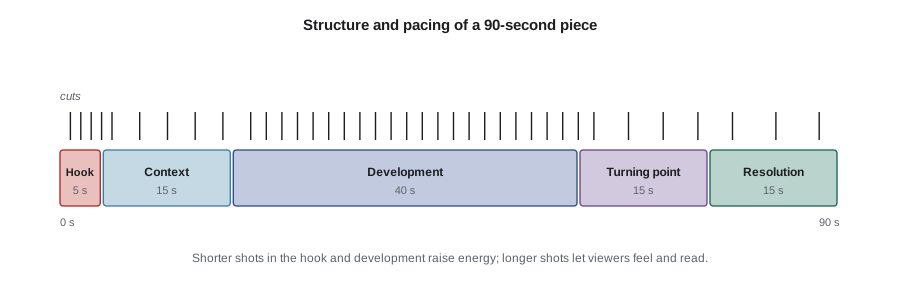
Structure and pacing
The story shapes from lesson 8 apply to all short pieces. The first two to five seconds decide whether a viewer keeps watching, especially in social feeds, so open with the strongest image, line or question rather than a slow logo animation. Pacing is the rate at which shots change and information arrives. Average shot length varies by genre: a fast social clip might average under 1.5 seconds per shot, a brand film 2 to 4 seconds, and a reflective profile 4 to 8 seconds. Vary pace within a piece: faster in energetic passages, slower when the viewer needs to absorb an emotional line or read text.
Hold shots long enough for the viewer to read them. A wide establishing shot of a busy market needs more time than a close-up of a hand pouring coffee. Text needs time too: a common rule is that viewers need about one second per three to four words, plus a short pause.
Cutting to music
Much client video is cut to music. Music gives structure and emotion, but it also controls the edit: cuts that land on beats feel deliberate, and cuts that land just off beats feel sloppy. The tempo, measured in beats per minute (BPM), sets the beat interval.
Worked problem
Planning cuts to a 120 BPM track
A 60-second brand piece uses a track at 120 BPM in 4/4 time. If you cut every two beats in energetic sections and every four beats in calmer ones, how long are the shots, and how many shots would a 60-second piece need if half is energetic and half calm?
Show solution
- Beat interval: \( 60 / 120 = 0.5 \) seconds.
- Two beats: 1 second per shot; four beats (one bar): 2 seconds per shot.
- Energetic 30 seconds: \( 30 / 1 = 30 \) shots. Calm 30 seconds: \( 30 / 2 = 15 \) shots.
Answer: About 45 shots. Not every cut should land on a beat; occasional cuts on the off-beat or on an accent in the melody add variety, and important dialogue sets its own timing.
def plan(bpm, sections):
    beat = 60 / bpm
    total = 0
    for name, seconds, beats_per_cut in sections:
        shot = beat * beats_per_cut
        n = seconds / shot
        total += n
        print(f'{name:10s} {seconds:3d} s, cut every {beats_per_cut} beats = {shot:.2f} s/shot, {n:.0f} shots')
    print(f'Total shots: {total:.0f}')
plan(120, [('intro', 8, 8), ('build', 22, 4), ('peak', 20, 2), ('outro', 10, 8)])intro 8 s, cut every 8 beats = 4.00 s/shot, 2 shots build 22 s, cut every 4 beats = 2.00 s/shot, 11 shots peak 20 s, cut every 2 beats = 1.00 s/shot, 20 shots outro 10 s, cut every 8 beats = 4.00 s/shot, 2 shots Total shots: 36
J cuts, L cuts and sound-led editing
Beginning editors cut picture and sound at the same point. Professional editors often stagger them. In a J cut, the sound of the next shot begins before its picture, so the viewer hears the speaker or the new location before seeing it. In an L cut, the sound of the current shot continues after the picture has changed, so a speaker's words carry over B-roll. These overlaps make edits smoother and more natural and are essential when covering interviews with B-roll. Natural sound from B-roll, brought up for a second between interview lines, gives a piece breath and texture.
Build the audio in layers: dialogue on one or two tracks, natural sound and effects on others, music on its own track. Keep dialogue clear above everything else, lower music under speech (called ducking) and fade in and out rather than cutting sound abruptly. Lesson 10 covers mixing and loudness.
Titles, lower thirds and graphics
Titles introduce the piece and the brand, lower thirds identify speakers with their names and roles, and on-screen text reinforces key points. Use the client's brand fonts and colors, keep text large enough to read on a phone, place it inside the safe areas from lesson 5, and keep it on screen long enough to read. For social pieces, burned-in captions of the dialogue are almost always needed, both for accessibility and because many viewers watch muted; lesson 10 covers caption formats.
Music licensing
Using music you do not have rights to is the most common legal mistake in client video. A song has two sets of rights: the composition (melody and lyrics, owned by the writers and their publishers) and the sound recording (owned by the record label or artist). Using a commercial song in a video requires a synchronization license for the composition and a master use license for the recording, negotiated with the rights holders; for well-known songs this is expensive or unavailable for small productions. Public performance of music on broadcast or in venues is licensed separately through performing rights organizations.
In the United States, ASCAP, BMI, SESAC and GMR administer public performance rights for songwriters and publishers; none of them grants synchronization rights for client videos, which must be cleared with publishers and labels or obtained through production music libraries.
For most hybrid jobs, the practical solution is a production music library or subscription service that licenses tracks for commercial use. Read the license: some subscriptions cover only your own channels, some require a separate license per client project, and some exclude broadcast, paid advertising or use after the subscription ends. Keep the license certificate for each track with the project files and give the client a copy. Platforms' automated content identification systems may still flag licensed tracks; the license and its identifier let you clear claims. Never accept a client's request to "just use" a commercial hit without proper clearance, and put the responsibility for client-supplied music in writing.
Review, feedback and revisions
Send cuts for review with a clear question: for a rough cut, "Is the story and structure right?"; for a fine cut, "Are there any factual errors, missing people or shots that must change?". Use review tools or shared players that allow timecoded comments, so feedback refers to exact moments instead of vague descriptions. Collect consolidated feedback from one person on the client side; conflicting notes from five managers in separate emails are a common cause of overruns. Track revision rounds against the contract.
How long editing takes
Editing time depends on the type of piece, the amount of footage, the number of review rounds and your experience. Rough planning figures for an experienced editor might be: a simple 30-second social clip, two to four hours; a 90-second brand piece with interview and music, one to two days; a four-minute wedding highlight film, two to four days. Logging and syncing footage, music searches, graphics, color, sound and exports all take time beyond the creative cut. Track your actual hours on every job for a few months and use the data to price future work (lesson 11).
| Piece | Raw footage | Editing time including review rounds |
|---|---|---|
| 30-second social clip, music and captions | 15 to 30 min | 2 to 4 hours |
| 60 to 90-second brand piece with interview | 1 to 2 h | 1 to 2 days |
| 3 to 5-minute wedding highlight film | 4 to 8 h | 2 to 4 days |
| 2-minute testimonial with two cameras | 1 h interview plus B-roll | 1 to 1.5 days |
| Set of 10 vertical clips from one shoot | 2 to 3 h | 1 to 2 days |
AI-assisted editing
AI features in editing software can save real time: automatic transcription and text-based editing, silence and filler-word removal, automatic reframing for vertical versions, scene detection, voice isolation and dialogue noise reduction, and auto-captioning. They also introduce risks: automatic cuts can change meaning, auto-reframe can crop awkwardly, and auto-captions contain errors that must be checked, especially for names and technical terms. Treat AI output as a first draft and review every decision. CRE-410 covers AI tools for creators in more detail, and PHOT-420 covers generative AI ethics and disclosure.
Common mistakes
MistakeReformatting cards before verifying backups
InsteadCopy with checksum verification to two separate drives before reusing a card.
MistakeEditing straight into a timeline without selects or string-outs
InsteadWatch everything, mark selects and build string-outs before structuring.
MistakeOpening with a slow logo animation
InsteadOpen with the strongest image, line or question in the first seconds.
MistakeUsing a commercial song because the client asked
InsteadUse properly licensed music and keep the license with the project.
MistakeCollecting feedback from many people separately
InsteadAsk for consolidated, timecoded notes from one client contact and track rounds.
Summary and key terms
- Use 3-2-1 backups and checksum-verified offloads from the first day.
- Proxies and organized bins make editing compressed 4K footage practical on modest computers.
- Work from selects and string-outs through assembly, rough cut, fine cut and picture lock.
- Strong openings, varied pacing and readable shots and text hold attention.
- Beat interval is 60 divided by BPM; cut on beats but vary the pattern.
- J and L cuts and layered sound make edits smooth and natural.
- Clear synchronization and master rights or use licensed production music, and manage review rounds.
- 3-2-1 backup
- Three copies, two media types, one copy off site.
- Checksum
- A digital fingerprint used to verify that copied files are identical.
- Proxy
- A small, easy-to-edit copy of a video file used during editing.
- Selects
- The best portions of footage chosen for possible use.
- String-out
- A timeline containing all selects of one type in sequence.
- Rough cut
- An early edit that establishes story, structure and length.
- Picture lock
- Agreement that the picture edit will not change further.
- J cut
- An edit where the next shot's sound starts before its picture.
- L cut
- An edit where the current shot's sound continues over the next picture.
- Synchronization license
- Permission to pair a musical composition with moving images.
Practice problems
Work each problem on paper first, then reveal the answer to check.
What is the beat interval at 100 BPM?
Show answer
0.6 seconds.
At an average shot length of 2.5 s, how many shots per minute?
Show answer
24.
What does 3-2-1 stand for?
Show answer
Three copies, two media types, one off site.
Why verify copies with checksums?
Show answer
To confirm that copied files are identical to the originals.
What is the difference between a J cut and an L cut?
Show answer
In a J cut sound leads picture; in an L cut sound trails picture.
Name the two sets of rights in a recorded song.
Show answer
The composition and the sound recording.
What does picture lock mean?
Show answer
No further changes to the picture edit; grading and mixing proceed.
How long should three lines of 8 words stay on screen at 3.5 words per second?
Show answer
About 7 seconds, plus a short pause.
Why build string-outs?
Show answer
To see all available material of one type and find gaps before structuring.
Name two risks of AI editing tools.
Show answer
Changing meaning with automatic cuts; awkward auto-reframe; caption errors.
Lesson quiz · 5 questions
Score 60% or more to complete this lesson.
Create a free account to save your progress, take quizzes and earn a certificate.