
SLS-221 · Lesson 6 of 12 · 21 min
Video prospecting
▶ Video coming soon A video version of this lesson is on the way.
On October 19, Maya found Tyler recording himself. He sat at his desk with the ring light on, a printed floor plan of a clinic held up beside his face, and spoke to his webcam for about seventy seconds. Then he watched the recording once, trimmed two seconds of silence from the start, typed a subject line and sent it to the office manager of a physiotherapy clinic in Maya's territory. "That's a video prospecting message," he said. "It's not a replacement for a call. It's a way to be a real person in someone's inbox."
This lesson covers two uses of video in inside sales. The first is video prospecting: short, recorded, personal videos sent by email, LinkedIn or text to prospects, usually as one touch in a cadence. The second is the live video meeting, which inside sellers use for discovery calls, demos and follow-ups that once happened in person. Both depend on the same basics: looking and sounding clear, being brief and being specific to the person watching.
Why video works, and when it does not
A short personal video does several things an email cannot. It shows the prospect a face and a voice, which helps establish that a real person is reaching out and not an automated system. It can show something: a product, a floor plan, a screen, the prospect's own website. And because personal videos take effort, they signal that the seller has thought about this particular prospect. Sales teams that use video often report higher reply rates for video touches than for plain emails, though most published figures come from vendors of video tools and use their own customers' data, so the size of the effect is uncertain.
Video also has costs and risks. It takes longer to make than an email, so it only pays off for prospects worth that time, usually tier A and some tier B accounts. Many people never press play: corporate email filters may strip links, and some people simply do not watch videos from strangers. A video that is generic, long or obviously recorded for hundreds of people at once loses everything that made it worth sending. And because a video shows the seller's face and voice, a poor one damages the seller's image more than a poor email does.
| Use video when | Skip video when |
|---|---|
| The account is tier A or a strong tier B with a clear trigger | The contact is tier C on a broad list |
| There is something to show: a floor plan, a product, their website | You would only be reading an email aloud |
| Earlier emails and calls have had no response | The prospect has asked for written information only |
| You can make it specific to this person in under a minute and a half | You would need several minutes to explain the point |
Structure of a prospecting video
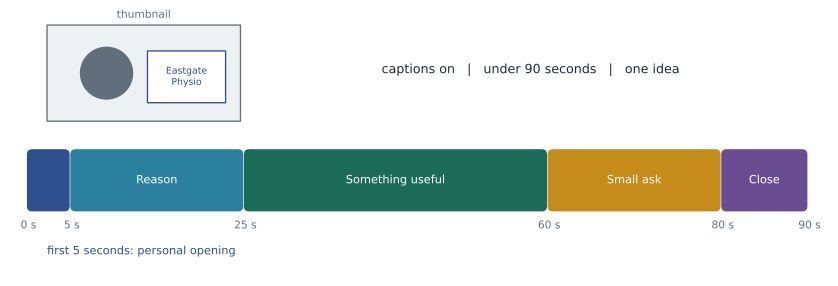
Tyler's videos followed a simple structure he had adapted from training material and his own testing. They ran 60 to 90 seconds. The first five seconds mattered most, because many viewers decide in that time whether to keep watching, and because many video tools show the opening frame as a thumbnail in the email.
| Part | Time | What Tyler did |
|---|---|---|
| Personal opening | 0 to 5 seconds | Said the person's name and held up something that showed it was for them, such as their website on screen or a note with their clinic name |
| Why I'm reaching out | 5 to 25 seconds | One specific reason: their lease timing, their new location, a problem common in clinics their size |
| Something useful | 25 to 60 seconds | One idea, example or question, often shown on screen |
| Clear, small ask | 60 to 80 seconds | A specific next step, such as a 15-minute call, with an easy way to say no |
| Close | 80 to 90 seconds | Thanked them and said his name again |
Worked problem
How long should the script be?
Tyler wants his videos to last no more than 75 seconds of speaking. People speak at different rates, but a comfortable, clear conversational pace on camera is often around 140 to 150 words per minute. About how many words should his speaking notes contain, and what happens if he writes 250 words?
Show solution
- Convert 75 seconds to minutes.
- \[\frac{75}{60} = 1.25 \text{ minutes}\]
- Words at 140 and 150 words per minute.
- \[1.25 \times 140 = 175 \qquad 1.25 \times 150 = 187.5\]
- Time needed for 250 words at 145 words per minute.
- \[\frac{250}{145} \approx 1.72 \text{ minutes} \approx 103 \text{ seconds}\]
Answer: His notes should contain about 175 to 190 words. At 250 words, he would need about 103 seconds at a normal pace, or would have to rush, which sounds scripted. Tyler kept his notes to bullet points totaling well under 200 words and spoke from them rather than reading.
Looking and sounding right
Viewers judge a video quickly on how it looks and sounds. Audio matters most: poor sound makes people stop watching faster than a plain background does. Tyler used a headset or a small desk microphone, recorded in a quiet room and checked that the fan in the corner was off. For picture, he placed the camera at eye level, sat facing a window or the ring light rather than with a bright window behind him, and kept the background tidy and free of anything confidential, such as customer names on a whiteboard.
He also kept the tone natural. Prospecting videos should look like a person talking to another person, not like advertising. One take with a small stumble is usually better than a polished recording that feels rehearsed. But one thing was never left to chance: the person's name. Tyler checked the pronunciation of any name he was unsure about, sometimes by listening to the person's own voicemail greeting, because getting it wrong in the first second undoes the point of personalizing.
Captions make videos easier to follow for people with hearing loss, people watching without sound in an open office, and people whose first language is not English. Most video tools can generate captions automatically; Tyler checked them before sending, because automatic captions often mangled company names and product terms.
Sending and following up
A prospecting video is usually sent as a link with a thumbnail image inside an email or LinkedIn message, because large video attachments are often blocked. The message around it matters as much as the video. It should make sense even if the prospect never presses play: a short subject line, two or three sentences that state the reason for writing and the ask, and the thumbnail. Tyler wrote the email first and recorded the video second, so the email could stand on its own.
Many video tools tell the sender when someone has watched and for how long. This is useful for timing a follow-up call, but it raises privacy questions, and it should never be mentioned to the prospect in a way that feels like surveillance. "I saw you watched my video twice yesterday at 9:14 p.m." is unsettling. "I sent you a short video last week about your lease; did it raise any questions?" is fine. Tracking data is also personal information under privacy law, so Ridgeline kept only what was needed for follow-up and deleted video viewing data along with other engagement data after 24 months of inactivity.
Worked problem
Did video help?
Over September and October, Tyler used a video for the day 10 touch with 46 tier B contacts and a plain LinkedIn comment or message for 52 similar contacts. The video group produced 7 replies from that point on in the cadence; the plain group produced 4. What were the reply rates, and how confident should Tyler be that video helped?
Show solution
- Video group reply rate.
- \[\frac{7}{46} = 0.152 \approx 15 \text{ in } 100\]
- Plain group reply rate.
- \[\frac{4}{52} = 0.077 \approx 8 \text{ in } 100\]
- The video group's rate is about twice the plain group's, but the numbers are small: three more replies could easily come from chance or from differences between the two groups.
Answer: Video replies ran at about 15 in 100 against about 8 in 100, which is encouraging but not conclusive with fewer than 50 contacts in each group. Grace suggested continuing the comparison until each group had at least 150 contacts and comparing meetings held, not just replies, before changing the standard cadence.
Live video meetings
Most of the inside team's meetings were live video calls. They worked best with three habits. First, a short written agenda sent beforehand, with the purpose of the call and its length, usually 15, 30 or 45 minutes rather than a full hour. Second, a clear structure on the call: a brief introduction, a check that the agenda still fits, the substance, and an agreed next step before the end. Third, fast written follow-up, usually within an hour, summarizing what was agreed, as SLS-211 described for discovery calls.
Video calls also need a few technical habits. Inside reps joined a minute early to check camera, microphone and screen sharing; kept a second screen for notes so they could look at the camera while talking; and closed email and chat notifications before sharing a screen. When a prospect did not turn on their camera, the reps kept theirs on but did not ask the prospect to turn on theirs: some people are in a shared space, some have weak connections and some simply prefer not to.
Recording live meetings needs care. Ridgeline recorded customer video calls only with the participants' agreement at the start of the call, noted the agreement in the CRM and deleted recordings after 12 months. AI note-taking tools that join calls are covered by the same rules, because they record and process what people say. SLS-140 explained Ridgeline's guideline: approved tools only, told to participants, and every AI summary checked by a person before it went into the CRM or to the customer.
Synthetic video and voice
Some video tools now offer AI features that generate a personalized video from a template, changing the spoken name and company for each viewer, or that create an AI avatar of the seller. These features can produce hundreds of "personal" videos without the seller recording any of them. Ridgeline did not allow them. Owen's reasoning was partly legal and partly about trust. A video that appears to be a personal message but was generated by software misleads the viewer about how much attention they are getting, and the rules on misleading representations in SLS-150 apply to sales messages. Voice cloning in calls raises the artificial-voice rules covered in lesson 5. And if a prospect discovers that the "personal" video was synthetic, any trust the seller built disappears.
The rule Ridgeline adopted was that any video a seller sends must be recorded by that seller, and any AI help, such as automatic captions or trimming, must not change what the seller said or who appeared to say it. Many companies now have similar policies, and some industry codes of conduct recommend disclosing any use of synthetic media in sales messages.
Video after the first meeting
Video is not only for prospecting. Inside reps also use short recorded videos after a meeting, where they can be more useful than a written summary. After a RoomFlow demo, Amira often recorded a two-minute screen video showing the exact settings she had discussed, so the prospect could forward it to colleagues who had missed the call. After a printer quote, Jordan sometimes recorded a one-minute walk-through of the proposal, pointing to the monthly cost, what was included and what the prospect needed to decide. These videos helped with a common problem in B2B selling: the person who met the seller is rarely the only person who decides, and a forwarded email loses much of what was said on the call. A short video lets the seller explain the proposal in their own words to people they have never met. The same rules apply as for prospecting videos: keep it short, make one point, check captions, and never include anything the customer would not want forwarded.
Common mistakes
MistakeSending video to every contact.
InsteadUse video for tier A and strong tier B accounts where there is something specific to show.
MistakeRecording a long, polished video.
InsteadKeep it to 60 to 90 seconds, speak from brief notes and accept small stumbles.
MistakeRelying on the video to carry the message.
InsteadWrite an email that works even if the video is never played.
MistakeTelling a prospect exactly when they watched.
InsteadUse viewing data to time a follow-up, but do not mention it in a way that feels like surveillance.
MistakeUsing AI-generated avatars or cloned voices to fake personal videos.
InsteadRecord your own videos; use AI only for help such as captions that does not change what was said.
Summary and key terms
- Video prospecting means short, recorded, personal videos sent as one touch in a cadence; live video meetings replace many in-person meetings.
- Video helps prospects see a real person and something specific, but takes effort, so it suits important accounts.
- Good prospecting videos last 60 to 90 seconds, earn attention in the first five seconds, give one reason and one useful idea, and ask for one small step.
- A 75-second video needs notes of about 175 to 190 words.
- Audio quality, lighting and captions matter.
- The email must stand on its own.
- Early comparisons favored video but used small samples.
- Live calls need agendas, structure, quick follow-up and consent before recording.
- Ridgeline does not allow synthetic videos or cloned voices.
- Video prospecting
- Sending short, recorded, personal videos to prospects as part of outreach.
- Thumbnail
- The still image shown in place of a video, often its opening frame.
- Captions
- On-screen text of what is said in a video.
- Viewing data
- Information from a video tool about whether and how long a recipient watched.
- Synthetic video
- Video generated or altered by software, such as an AI avatar or a template with substituted words.
- Agenda
- A short written plan for a meeting, sent beforehand, with its purpose and length.
Practice problems
Work each problem on paper first, then reveal the answer to check.
At 145 words per minute, how many words fill 60 seconds?
Show answer
About 145 words.
A video group of 40 had 5 replies and a plain group of 40 had 3. What would you conclude?
Show answer
Rates of 12.5 and 7.5 in 100, but the groups are far too small to say video helped; keep testing.
Give two habits that make a live video meeting work well.
Show answer
Any two of: send a short agenda, check the agenda at the start, agree a next step before the end, follow up in writing within an hour, join early to check equipment.
Lesson quiz · 5 questions
Score 60% or more to complete this lesson.
Create a free account to save your progress, take quizzes and earn a certificate.