
CRE-450 · Lesson 10 of 12 · 30 min
Accessibility and inclusion
Responsible content reaches everyone it is meant for. A large share of the audience has a disability that affects how they see, hear, move or process information, and many more people use accessibility features in everyday situations, such as watching with the sound off on a bus. Accessibility is partly a legal matter, but for most creators it is mainly about good practice and a bigger, more loyal audience. This lesson covers captions and transcripts, audio description, alt text, visual design and contrast, plain language, inclusive representation, and the legal context in Canada and the US.
Who benefits
Statistics Canada's 2022 Canadian Survey on Disability found that 27 % of Canadians aged 15 and older, about 8 million people, had one or more disabilities. Disabilities related to pain, flexibility, mobility and mental health were most common, and seeing, hearing, learning and memory disabilities each affected large numbers of people. Many more people benefit from accessible design without having a disability: viewers watching without sound, people learning English or French, older viewers and people with temporary injuries.
A useful idea is the curb-cut effect. Curb cuts were designed for wheelchair users, but they also help people with strollers, luggage and bicycles. Captions work the same way: they serve Deaf and hard-of-hearing viewers and also help everyone in noisy places, viewers with different accents and people searching for content, because captions make videos more discoverable.
Captions and transcripts
Captions are the single most important accessibility feature for video. Automatic captions have improved greatly, but they still make errors with names, technical terms, accents and overlapping speech, and they rarely include non-speech information. Good captions are accurate, synchronized, complete and readable.
| Quality | What it means |
|---|---|
| Accurate | Words match what is said, including names and technical terms |
| Synchronized | Captions appear when the words are spoken |
| Complete | Include speaker identification and important sounds, such as [music] or [door slams] |
| Readable | Short lines, enough time on screen, good contrast and placement that does not cover key visuals |
Caption reading speed is commonly measured in characters per second. Guidelines vary, but many broadcasters and streaming services aim for roughly 15 to 20 characters per second for adults and slower for children's content. A full transcript, posted on a website or in a description, helps people who use screen readers or braille displays and makes content searchable.
Worked problem
Checking caption reading speed
A caption reads "Before we start, make sure the oven is fully preheated." It contains 55 characters including spaces and stays on screen for 2.5 seconds. Is it within a 17 characters-per-second guideline? How long should it stay up?
Show solution
- Speed: \( 55 \div 2.5 = 22 \) characters per second, faster than 17.
- Minimum duration at 17 cps: \( 55 \div 17 \approx 3.2 \) seconds.
- Options: extend the caption to about 3.2 seconds, or split it into two shorter captions.
Answer: At 22 characters per second it is too fast; it should stay up for at least about 3.2 seconds or be split.
Audio description
Audio description narrates important visual information for blind and partially sighted viewers: actions, scene changes, on-screen text and facial expressions that the audio alone does not convey. For many creator videos, the most practical approach is described video built into the main audio: saying aloud what you are doing and reading out on-screen text, for example "I'm adding two cups of flour" rather than "I'm adding this". Some platforms also support separate audio description tracks.
- Read aloud important on-screen text, such as prices, steps and links.
- Describe key actions and visuals when they matter to understanding.
- Avoid relying on phrases like "as you can see" or "this one" without saying what it is.
Alt text and image descriptions
Alt text is a short written description of an image that screen readers read aloud. Most platforms let creators add alt text to images and some to thumbnails. Good alt text describes what is important about the image in context, briefly, without starting with "image of". For complex images such as charts, include the key point the image shows, as this course does for its figures.
Visual design and contrast
Text on screen, thumbnails and graphics must be readable for people with low vision or colour vision deficiencies. The Web Content Accessibility Guidelines (WCAG), published by the World Wide Web Consortium, are the international standard. Version 2.2, published in October 2023, keeps the contrast rules from earlier versions: a contrast ratio of at least 4.5 to 1 for normal text and 3 to 1 for large text at level AA.
The contrast ratio compares the relative luminance, or perceived brightness, of the lighter and darker colours:
where \( L_1 \) is the relative luminance of the lighter colour and \( L_2 \) of the darker, each between 0 for black and 1 for white. Free contrast checkers calculate it from colour codes.
Worked problem
Calculating a contrast ratio
White text (relative luminance 1.0) is placed on a mid-grey background with relative luminance 0.20. Does it meet the 4.5 to 1 requirement for normal text?
Show solution
- Ratio: \( (1.0 + 0.05) \div (0.20 + 0.05) = 1.05 \div 0.25 = 4.2 \).
- This is below 4.5, so it fails for normal text, though it passes the 3 to 1 threshold for large text.
- A darker background with luminance 0.15 gives \( 1.05 \div 0.20 = 5.25 \), which passes.
Answer: A ratio of 4.2 fails for normal text but passes for large text. Darkening the background to a luminance of 0.15 gives 5.25, which passes.
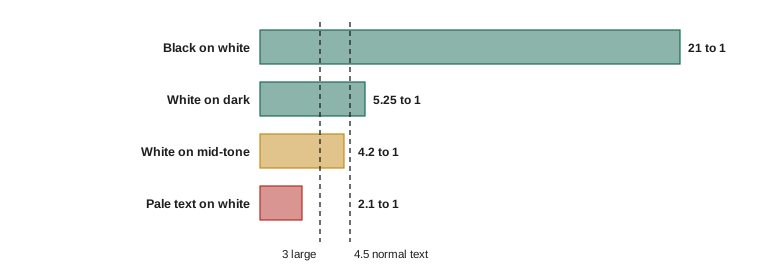
Other visual practices help too: do not rely on colour alone to convey meaning, avoid rapidly flashing content, which can trigger seizures in people with photosensitive epilepsy (WCAG sets a limit of three flashes in any one second), and keep on-screen text large enough to read on a phone.
Plain language
Plain language means writing and speaking so that the audience can understand information the first time. It helps people with cognitive and learning disabilities, people reading in a second language and busy viewers. Readability formulas give a rough measure. The Flesch Reading Ease score, for example, is:
Higher scores mean easier text; scores of 60 to 70 are generally considered plain English for adults.
Worked problem
Estimating a readability score
A video description has 120 words in 6 sentences with 180 syllables. What is its Flesch Reading Ease score?
Show solution
- Words per sentence: \( 120 \div 6 = 20 \).
- Syllables per word: \( 180 \div 120 = 1.5 \).
- Score: \( 206.835 - 1.015 \times 20 - 84.6 \times 1.5 = 206.835 - 20.3 - 126.9 \approx 59.6 \).
Answer: About 60, at the edge of plain English. Shorter sentences and simpler words would raise it. Formulas are only a guide; testing with real viewers is better.
Inclusive representation
Inclusion is broader than technical accessibility. It includes who appears in content, how they are portrayed and whose stories are told. Practices include featuring people with disabilities as full participants rather than as inspiration for non-disabled viewers, avoiding stereotypes about any group, asking communities how they prefer to be described, and paying collaborators from under-represented groups fairly. Disabled creators have criticized content that presents disability mainly as tragedy or as a feel-good moment for others; letting people tell their own stories avoids this.
The legal context
In Canada, the Accessible Canada Act of 2019 requires federally regulated organizations, such as banks, broadcasters and telecommunications companies, to identify and remove barriers and publish accessibility plans. The CRTC sets captioning and described video requirements for broadcasters, and the Online Streaming Act gives it powers over online services. Provinces have their own laws: Ontario's Accessibility for Ontarians with Disabilities Act requires many organizations to make websites meet WCAG 2.0 level AA, and Manitoba, Nova Scotia and British Columbia have accessibility laws too. Most individual creators are not directly covered, but brands and broadcasters who commission creator content often are, and they increasingly require accessible deliverables.
An accessibility audit
Worked problem
Scoring an accessibility audit
A creator audits 20 recent videos on five checks, one point each: accurate edited captions, on-screen text read aloud, alt text on thumbnails or images where possible, text contrast of at least 4.5 to 1, and no rapid flashing. The results are 14, 9, 6, 16 and 20 videos passing respectively. What is the overall pass rate, and which check needs the most work?
Show solution
- Total passes: \( 14 + 9 + 6 + 16 + 20 = 65 \) out of \( 5 \times 20 = 100 \) possible.
- Overall pass rate: 65 %.
- Lowest check: alt text, at 6 of 20, or 30 %.
Answer: An overall pass rate of 65 %, with alt text the weakest area. Fixing the weakest check first gives the biggest improvement for the effort.
Accessibility in livestreams and short video
Livestreams and short videos raise particular challenges. Live captions generated automatically are often the only practical option for streams, so speaking clearly, avoiding talking over others and repeating viewers' questions aloud improves their accuracy. For short vertical video, keep captions away from the areas covered by platform buttons and descriptions, use large text and give viewers enough time to read on-screen text before cutting away. Many short-video apps offer automatic captions that creators can edit before posting; editing them takes a minute and greatly improves accuracy, especially for names and technical terms.
Asking your audience
The best way to find out whether content is accessible is to ask the people who use accessibility features. Invite feedback in descriptions or community posts, respond to requests for captions or descriptions, and consider paying disabled consultants to review content or templates. Disabled viewers often notice barriers that creators never would, and acting on their feedback signals that the channel values them.
Inclusive language
Inclusive language avoids excluding or stereotyping people. Practical habits include using gender-neutral terms where gender is unknown or irrelevant, avoiding phrases that treat disability as a metaphor for something negative, describing people by their own preferred terms and avoiding jokes that rely on stereotypes. Communities differ in their preferences: some disabled people prefer person-first language, such as "person with a disability", while others, including many Deaf and autistic people, prefer identity-first language. When in doubt, ask or follow the person's own usage.
Accessibility is also a craft skill that improves with practice. Once captions, spoken descriptions and good contrast become routine, they add little time to production and make every video better for everyone.
Common mistakes
MistakeRelying on uncorrected automatic captions.
InsteadEdit captions for accuracy, add speaker labels and sounds, and check reading speed.
MistakeSaying "as you can see" without describing what is shown.
InsteadDescribe important visuals and read on-screen text aloud.
MistakePlacing light text on mid-tone backgrounds.
InsteadCheck contrast reaches at least 4.5 to 1 for normal text.
MistakeUsing colour alone to show meaning.
InsteadAdd labels, patterns or text so meaning does not depend on colour.
MistakePresenting disabled people mainly as inspiration.
InsteadFeature people as full participants and let them tell their own stories.
Summary and key terms
- About 27 % of Canadians aged 15 and older have a disability, and many more benefit from accessible design.
- Good captions are accurate, synchronized, complete and readable, at roughly 15 to 20 characters per second.
- Audio description, including describing visuals aloud, serves blind and partially sighted viewers.
- WCAG 2.2 requires contrast of 4.5 to 1 for normal text and 3 to 1 for large text.
- Avoid relying on colour alone and avoid flashing more than three times a second.
- Plain language and readability checks help many viewers understand content the first time.
- The Accessible Canada Act, CRTC rules and provincial laws such as the AODA shape requirements for organizations.
- Accessibility
- Designing content so that people with disabilities can use it.
- Captions
- Synchronized text of speech and important sounds in a video.
- Audio description
- Narration of important visual information for blind and partially sighted viewers.
- Alt text
- A written description of an image read by screen readers.
- WCAG
- The Web Content Accessibility Guidelines, the international accessibility standard.
- Contrast ratio
- A measure of the difference in brightness between text and background.
- Curb-cut effect
- The way accessibility features benefit many people beyond their original users.
- Plain language
- Communication the audience can understand the first time.
- Flesch Reading Ease
- A readability score based on sentence and word length.
- Screen reader
- Software that reads on-screen content aloud.
Practice problems
Work each problem on paper first, then reveal the answer to check.
What is the curb-cut effect?
Show answer
Accessibility features benefiting many people beyond their intended users.
Name the four qualities of good captions.
Show answer
Accurate, synchronized, complete and readable.
A 48-character caption is on screen for 2 seconds. What is its speed?
Show answer
24 characters per second.
What is the WCAG AA contrast ratio for normal text?
Show answer
4.5 to 1.
Lighter luminance 1.0, darker 0.1. Contrast ratio?
Show answer
1.05 ÷ 0.15 = 7.
What flash limit does WCAG set?
Show answer
No more than three flashes in any one second.
100 words, 5 sentences, 140 syllables. Flesch score?
Show answer
206.835 − 20.3 − 118.4 ≈ 68.1.
Name two ways to add audio description in a creator video.
Show answer
Describe actions aloud, read on-screen text, add a description track.
Which Ontario law requires WCAG 2.0 AA for many organizations?
Show answer
The Accessibility for Ontarians with Disabilities Act.
Name one inclusive representation practice.
Show answer
Feature disabled people as full participants, avoid stereotypes, ask about preferred terms, pay fairly.
Lesson quiz · 5 questions
Score 60% or more to complete this lesson.
Create a free account to save your progress, take quizzes and earn a certificate.