
ITIL-140 · Lesson 10 of 12 · 28 min
Knowledge management in support
Every practice in this course depends on knowledge. The service desk resolves contacts at first contact only if agents can find the answer. Incident management restores service faster when runbooks exist. Problem management's workarounds are useless unless people can find them. Service request management's self-service portal works only if its articles are clear. Change enablement relies on documented procedures for standard changes. This lesson looks at knowledge management, a general management practice whose purpose, in plain words, is to maintain and improve the effective, efficient and convenient use of information and knowledge across the organization. It focuses on how support organizations capture, share and improve knowledge, and on shift-left, the strategy of resolving work closer to the user.
Data, information and knowledge
ITIL distinguishes data (raw facts, such as a log entry), information (data in context, such as a report showing that a server's errors began after a change) and knowledge (information combined with experience and judgement that enables action, such as knowing which fix works for that error and when it is safe to apply). Some models add wisdom, the ability to apply knowledge wisely in new situations. Knowledge can be explicit, written down in articles and runbooks, or tacit, held in people's heads and shared through conversation and practice. Much support knowledge starts tacit and must be made explicit to be shared at scale.
| Level | Example in support |
|---|---|
| Data | Error code 0x80070005 appears in a log |
| Information | The error appears for users in one department since this morning's group policy change |
| Knowledge | The error means access denied; reverting the policy or adding the department group restores access |
| Wisdom | Knowing to check the policy change process so it does not happen again |
Types of support knowledge
Support organizations rely on several kinds of documented knowledge. Knowledge articles help agents and users solve common issues or answer questions. Runbooks and standard operating procedures guide technical staff through operational tasks and recovery actions. Known error records describe problems and workarounds. Service documentation explains how services work, who owns them and how they depend on each other. Post-incident reviews capture lessons from failures. Each type has a different audience, level of detail and review cycle.
| Knowledge type | Audience | Example |
|---|---|---|
| User-facing article | Users through self-service | How to connect to the VPN from home |
| Agent article | Service desk agents | Diagnosing VPN failures by error code |
| Runbook | Technical teams and on-call engineers | Failing over the customer database to the standby site |
| Known error record | Service desk and resolvers | Mobile email sync fails after update; workaround: remove and re-add account |
| Service documentation | Support and service owners | Architecture, owners, dependencies and contacts for the payroll service |
Knowledge-Centered Service (KCS)
Knowledge-Centered Service, developed by the Consortium for Service Innovation, is a widely used methodology for support knowledge. Its central idea is that knowledge should be created and improved as a by-product of solving issues, not as a separate documentation project. When an agent resolves an issue, they search for an existing article; if one exists, they use it and improve it if needed; if not, they create one. Articles are written in the context of the user, using their words, and are published quickly so others benefit at once. Quality improves through use: every reuse is a chance to flag or fix inaccuracies.
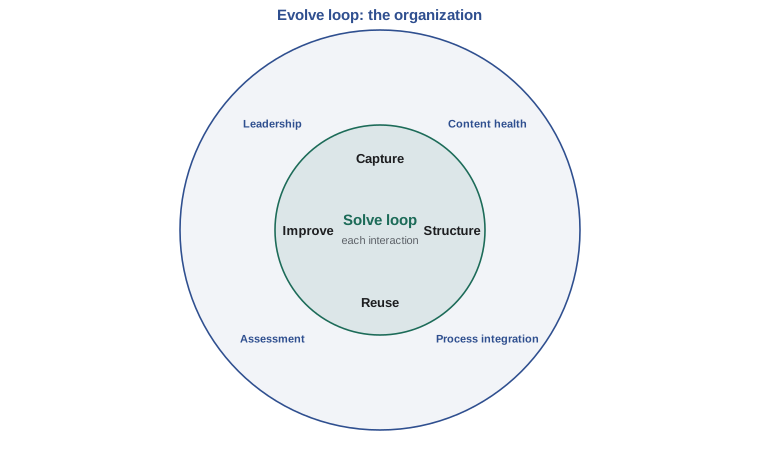
KCS describes two loops. The solve loop happens within each interaction: capture the user's words, structure the article, reuse what exists, improve it. The evolve loop happens at the organizational level: analyse article use and gaps, improve processes, measure performance and build a culture that values knowledge sharing. Organizations that adopt KCS often report faster resolution, higher first contact resolution and higher self-service success, though results depend on commitment and leadership.
Worked problem
Search early, search often
An agent receives a contact about an error message when submitting timesheets. Describe how KCS guides the agent.
Show solution
- Capture the user's exact words and the error message in the ticket.
- Search the knowledge base using those words before diagnosing.
- If an article matches, follow it, link it to the ticket and fix any step that is out of date.
- If no article matches, resolve the issue and create a short article in the user's words, marked as draft or published according to the agent's licence level.
- Over time, article use data shows whether timesheet errors are rising, which may point to a problem.
Answer: KCS makes searching, using and improving articles part of every resolution, so knowledge grows with the work.
Writing good knowledge articles
Good articles are findable, accurate, concise and usable. They have titles that match how users describe the issue ("Outlook keeps asking for my password" rather than "Credential prompt loop in MAPI clients"). They state the environment (which application, version or device), the issue in the user's words, the cause if known and the resolution in numbered steps. They avoid jargon in user-facing articles and include screenshots or short videos where helpful, with text alternatives for accessibility. They record who owns the article and when it was last reviewed.
| Article section | Purpose | Example content |
|---|---|---|
| Title | Match how users search | Teams camera shows a black screen |
| Environment | Say where the article applies | Windows 11 laptops, Teams desktop app |
| Issue | Describe the symptom in user words | Other people cannot see me; my camera preview is black |
| Cause | Explain briefly if known | Another app is using the camera, or privacy settings block it |
| Resolution | Numbered, testable steps | 1. Close other apps that use the camera. 2. Check camera privacy settings… |
| Metadata | Ownership and freshness | Owner: end-user computing team; last reviewed 2026-09-14 |
Shift-left
Shift-left means moving the resolution of work closer to the user and earlier in the support chain. In the simplest model, levels run from self-service (level 0) through the service desk (level 1) to specialist teams (levels 2 and 3) and suppliers. Each step left is usually faster and cheaper: a user who fixes an issue from a good article in two minutes is better served than one who waits in a queue for a specialist. Shift-left depends on knowledge and on tools: articles for users, scripts and remote tools for agents, and automation for routine fixes.
Shift-left can also mean moving knowledge earlier in the lifecycle: designing services so that common issues are prevented, including support teams in design and transition, and making sure runbooks and articles exist before a service goes live. Some organizations call this shift-left in development and design, and the most effective support improvement often happens here.
The program below estimates the effect of a shift-left initiative on cost and on the average time users wait for resolution. The costs and times per level are illustrative; in practice each organization measures its own.
# Effect of shift-left on cost and user wait (illustrative figures)
levels = ["self-service", "service desk", "level 2", "level 3"]
cost = [2.0, 16.0, 60.0, 150.0]          # cost per resolved contact, dollars
wait_h = [0.1, 0.5, 8.0, 30.0]           # typical time to resolution, hours
before = [0.10, 0.55, 0.28, 0.07]        # share of 8,000 monthly contacts resolved at each level
after = [0.30, 0.50, 0.16, 0.04]
N = 8000

def summarize(mix):
    c = sum(N * m * k for m, k in zip(mix, cost))
    w = sum(m * t for m, t in zip(mix, wait_h))
    return c, w

c0, w0 = summarize(before)
c1, w1 = summarize(after)
print(f"{'level':14}{'before':>8}{'after':>8}")
for lv, b, a in zip(levels, before, after):
    print(f"{lv:14}{b:>8.0%}{a:>8.0%}")
print(f"monthly cost:  ${c0:,.0f} -> ${c1:,.0f}  (saving ${c0 - c1:,.0f})")
print(f"average time to resolution: {w0:.1f} h -> {w1:.1f} h")level before after self-service 10% 30% service desk 55% 50% level 2 28% 16% level 3 7% 4% monthly cost: $290,400 -> $193,600 (saving $96,800) average time to resolution: 4.6 h -> 2.8 h
Moving a fifth of contacts into successful self-service and a smaller share away from levels 2 and 3 roughly halves the average time to resolution and saves a large share of monthly cost. The calculation assumes that self-service actually works. If users try self-service, fail and then call the service desk, cost rises and satisfaction falls. Measuring self-service success, not just self-service visits, is essential.
Worked problem
Self-service success
A portal records 12,000 article views a month. A survey widget shows that 45 % of viewers say the article solved their issue, and records show 2,100 users raised a ticket within an hour of viewing an article on the same topic. Estimate self-service success and comment.
Show solution
- Self-reported success: 45 % × 12,000 = 5,400 resolutions.
- Users who viewed an article and still raised a ticket: 2,100, or 17.5 % of views.
- The articles behind those 2,100 tickets should be reviewed first; they are being found but are not solving the issue.
Answer: About 5,400 contacts a month are resolved by self-service, but 2,100 views lead to tickets, which identifies articles to improve.
Keeping knowledge healthy
Knowledge decays. Applications change, procedures are updated and articles written for last year's version become wrong. Outdated articles are worse than none, because users and agents trust them and waste time following wrong steps. Knowledge health practices include owners for each article, review dates, flags that users and agents can raise when an article is wrong, analysis of articles that are never used (candidates for retirement) or heavily used (candidates for automation or for problem management), and retiring articles when services are decommissioned.
| Knowledge metric | What it shows | Caution |
|---|---|---|
| Article reuse rate | How often existing articles solve issues | Requires agents to link articles to tickets |
| Self-service success rate | Share of users who resolve issues without a ticket | Self-reported success can be biased |
| Articles flagged as wrong | Quality problems | A low number may mean nobody bothers to flag |
| Time to publish | How quickly new knowledge becomes available | Speed without review can spread errors |
| Share of incidents resolved using an article | Contribution of knowledge to resolution | Linking discipline affects the result |
Culture and incentives
Knowledge sharing is ultimately a cultural issue. In some organizations, expertise is a source of status or job security, so people hoard it. Measuring agents only on tickets closed discourages them from spending time on articles. Rewarding people for knowledge contributions, recognizing articles that save time, building knowledge work into roles and giving time for it all help. KCS uses a licensing model in which agents earn the right to publish directly as they show they write good articles. Leaders matter most: when managers ask "is there an article for that?" and value the answer, knowledge sharing grows.
Knowledge, AI assistants and privacy
Generative AI tools are changing support knowledge. They can suggest articles to agents, draft articles from resolved tickets, summarize long incident histories and answer user questions using the knowledge base. Their usefulness depends entirely on the quality of the knowledge they draw on: an assistant trained or grounded on outdated or wrong articles will confidently give wrong answers. Organizations should keep humans responsible for article accuracy, review AI-drafted content before publication, and monitor AI answers for errors. ITIL-150 covers AI governance in depth.
Knowledge bases can also contain personal information by accident, for example when tickets with names and account numbers are turned into articles. Articles should be stripped of personal information before publication, especially user-facing ones. Privacy laws in both countries expect organizations to limit the use of personal information to its purposes: in Canada, PIPEDA and provincial laws such as Quebec's Law 25; in the United States, sector laws such as HIPAA for health information and a growing number of state privacy laws. Feeding tickets into an AI tool also raises questions about where that data goes and how it is used.
Common mistakes
MistakeTreating knowledge as a documentation project done after the work.
InsteadCapture and improve knowledge as part of resolving issues, as KCS recommends.
MistakeWriting article titles in technical terms.
InsteadUse the words users actually search with.
MistakeCounting portal visits as self-service success.
InsteadMeasure whether users resolved their issue without raising a ticket.
MistakeLeaving articles without owners or review dates.
InsteadAssign owners, review regularly, let users flag errors and retire outdated content.
MistakeLetting AI tools answer from unreviewed knowledge.
InsteadKeep humans responsible for accuracy and monitor AI answers.
Summary and key terms
- Knowledge management maintains and improves the effective, efficient and convenient use of information and knowledge.
- Data becomes information in context and knowledge when combined with experience; much support knowledge starts tacit.
- Support relies on user articles, agent articles, runbooks, known error records and service documentation.
- KCS captures and improves knowledge as part of solving issues, through the solve and evolve loops.
- Shift-left resolves work closer to the user and earlier in the lifecycle, cutting cost and waiting time.
- Knowledge decays, so ownership, review and retirement keep it healthy.
- Culture, incentives and careful use of AI and personal information determine success.
- Knowledge management
- The practice of maintaining and improving the effective, efficient and convenient use of information and knowledge.
- Explicit knowledge
- Knowledge that has been written down and can be shared directly.
- Tacit knowledge
- Knowledge held in people's experience that is hard to write down.
- Knowledge article
- A documented solution or answer for a specific issue or question.
- Runbook
- Step-by-step instructions for an operational or recovery task.
- Knowledge-Centered Service (KCS)
- A methodology that creates and improves knowledge as a by-product of solving issues.
- Solve loop
- The KCS activities within each interaction: capture, structure, reuse and improve.
- Evolve loop
- The KCS activities at organizational level: content health, process integration, assessment and leadership.
- Shift-left
- Moving resolution closer to the user and earlier in the support chain or lifecycle.
- Self-service success rate
- The share of users who resolve their need through self-service without raising a ticket.
Practice problems
Work each problem on paper first, then reveal the answer to check.
Distinguish data, information and knowledge with a support example.
Show answer
Data: an error code. Information: the error appears for one department since a change. Knowledge: what it means and how to fix it.
What is the central idea of KCS?
Show answer
Create and improve knowledge as a by-product of solving issues, not as a separate project.
Name the four steps of the KCS solve loop.
Show answer
Capture, structure, reuse and improve.
Rewrite "SSO token expiry in SAML flow" as a user-friendly article title.
Show answer
For example: "I am asked to sign in again every few minutes".
Why can shift-left raise costs if done badly?
Show answer
If self-service fails, users still contact the desk after wasting time, adding cost and frustration.
A portal has 8,000 article views and 1,200 users raise a ticket on the same topic within an hour. What share of views is that?
Show answer
15 %.
Give two signs that an article needs attention.
Show answer
It is flagged as wrong, it is never used, or it is often followed by a ticket (any two).
Why are outdated articles worse than none?
Show answer
People trust them and waste time following wrong steps.
What is one risk of AI-drafted knowledge?
Show answer
It may contain errors or be based on outdated articles; it needs human review.
Why should personal information be removed from articles?
Show answer
To protect privacy and comply with laws limiting use of personal information to its purposes.
Lesson quiz · 5 questions
Score 60% or more to complete this lesson.
Create a free account to save your progress, take quizzes and earn a certificate.