
ITIL-140 · Lesson 6 of 12 · 31 min
Service request management and the service catalogue
Not everything users ask for is a fault. Every day, people need a password reset, access to a system, a new laptop, a software licence, a meeting room set up or an answer to a question. These predictable, routine requests often make up the largest share of a service desk's volume. Service request management makes them easy to ask for and efficient to fulfil. In plain words, its purpose is to support the agreed quality of a service by handling all predefined, user-initiated service requests in an effective and user-friendly way.
What a service request is
ITIL describes a service request as a request from a user or a user's authorized representative that initiates a service action which has been agreed as a normal part of service delivery. The key words are predefined and agreed. A service request is something the provider has already decided it will do, has a known procedure for and, usually, has standard approvals and targets for. That is what distinguishes requests from incidents (something has gone wrong) and from changes that need individual assessment (something new or risky).
Typical categories of request include requests for a service delivery action (provide a report, replace a toner cartridge), requests for information (how do I do this, what is the status of my order), requests for provision of a resource or service (a laptop, access to an application, a mailbox), requests for access (permissions to a shared folder), feedback, compliments and complaints. Some organizations also treat certain low-risk, pre-authorized changes as service requests, such as installing approved software; lesson 7 explains how these relate to standard changes.
| Request type | Example | Typical approval | Automation potential |
|---|---|---|---|
| Information | How do I book a meeting room with video? | None | High: knowledge article or virtual agent |
| Access | Add me to the finance reporting group | Data or system owner | High: workflow with approval and automatic provisioning |
| Resource provision | New laptop for a new hire | Manager, budget holder | Medium: ordering and imaging can be automated; delivery is physical |
| Service action | Restore a deleted file from backup | None or data owner | Medium: depends on backup tooling |
| Pre-authorized change | Install an approved software package | Pre-approved | High: self-service software centre |
| Feedback | The new expenses form is confusing | None | Low: needs human review |
Standardizing requests
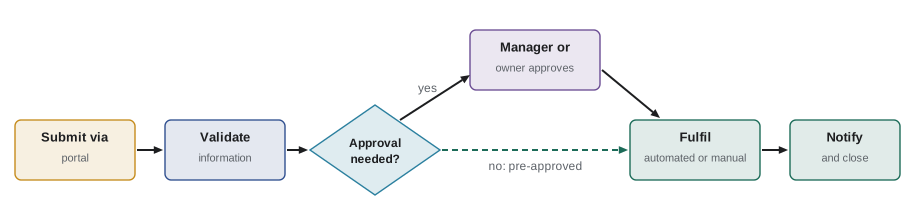
The heart of service request management is standardization. Each request type should have a defined workflow: what information is needed from the user, what approvals are required, which teams or systems fulfil it, what the target time is and how the user is kept informed. These workflows can be simple or complex, but they should be designed once and reused, not reinvented for each request.
Standardization brings several benefits. Users know what to expect. Fulfilment teams can plan and measure their work. Approvals that are genuinely necessary are built in, while unnecessary ones can be identified and removed. Automation becomes possible because the steps are known. ITIL-120's guiding principles apply directly: keep it simple and practical, optimize and automate, and focus on value.
Worked problem
Designing a request workflow
Design a workflow for "access to the customer relationship management (CRM) system". What information, approvals and steps are needed?
Show solution
- Information from the requester: user name, role, access level needed (read, edit, administer), business justification, start date.
- Approvals: line manager confirms the business need; the CRM system owner approves edit or administrator access; read access for listed roles is pre-approved.
- Fulfilment: an automated script creates the account and assigns the role; a licence is allocated from the pool.
- Notification: the user receives a welcome message with training links; the request closes automatically when the account is active.
Answer: A standard workflow with role-based pre-approval for read access and owner approval for higher access lets most requests complete automatically within minutes while protecting sensitive data.
The service catalogue
Users need a place to see what they can ask for. The service catalogue is structured information about all the services and service offerings of a provider that are relevant to a specific audience. ITIL treats service catalogue management as a separate practice, but service request management depends on it, because the requestable items in the catalogue are the entry point for most requests.
A good catalogue is written in the user's language, not the provider's. "Get access to the shared finance drive" is better than "NAS share provisioning – FIN01". Items are grouped the way users think about their needs, such as by life event (starting a job, changing role, leaving), by device or by business task. Each item shows what the user will get, what it costs if chargeback applies, who must approve, how long it will take and what information is needed. Different views can serve different audiences: employees see requestable items, managers see team-related items, and technical staff see a more detailed technical catalogue.
| Catalogue item element | Example for "new laptop" |
|---|---|
| Name in user language | Get a new or replacement laptop |
| Description | Standard business laptop with approved software, set up and ready to use |
| Who can request | Managers for new staff; any employee for a replacement under warranty |
| Approvals | Manager; cost centre owner if not a standard model |
| Target time | 3 business days for standard models in stock |
| Cost | Charged to the team's cost centre (where chargeback applies) |
| Information required | User, location, model, delivery address, start date |
Self-service and portals
Most organizations now offer requests through a self-service portal, often combined with a knowledge base and status tracking. A well-designed portal lets users find what they need in a few clicks or a search, submit a request with the right information the first time, see its progress and receive notifications. Virtual agents can guide users through common requests conversationally. Self-service reduces service desk load and cost, but only if the portal is easy to use. A confusing portal simply moves frustration and generates phone calls asking how to use the portal.
Good portal design draws on user experience research: test with real users, use plain language, minimize the number of fields, pre-fill what is already known (such as the user's department), and offer a way to reach a person when the portal does not fit. Accessibility is a legal and ethical requirement. Public sector portals in Canada must meet accessibility standards under the Accessible Canada Act and provincial laws such as Ontario's AODA, and in the United States under Section 508 and, increasingly, the ADA rules for state and local government websites. Most refer to the Web Content Accessibility Guidelines (WCAG).
Approvals
Approvals protect the organization, but each one adds delay. Many request workflows accumulate approvals over time because each incident or audit finding adds one more check, and nobody removes them. Service request management should review approvals regularly and ask whether each one is still needed, whether it can be delegated or pre-approved by role, and whether it can be done automatically using data the organization already has (for example, checking that the requester is in an eligible job role).
Worked problem
The cost of an approval step
A software request requires approval from the manager and then from the IT budget holder. Each approval waits on average 1.5 business days. 1,200 such requests are made each year, and 97 % are approved. If the budget holder approval is replaced by a pre-approved list of standard software, how much waiting is removed?
Show solution
- Waiting removed per request: 1.5 business days.
- Total per year: 1,200 × 1.5 = 1,800 business days of waiting.
- With 97 % approved anyway, the budget holder approval adds delay without changing most outcomes; a spending cap or periodic review of licence use can provide control instead.
Answer: Removing the second approval eliminates about 1,800 business days of user waiting a year, with controls moved to a lighter-weight review.
Automation
Because service requests are predictable, they are prime candidates for automation. Password resets, account unlocks, group membership changes, software installation from an approved catalogue, mailbox creation and many cloud resource requests can be fully automated. Others can be partly automated, such as ordering a laptop automatically while a person handles delivery. The guiding principle optimize and automate reminds us to simplify the workflow first; automating a bad workflow just produces bad results faster.
The program below compares two years of costs for a request type before and after automation, including the one-time cost of building the automation and an ongoing maintenance cost. It reports the payback period and the change in average fulfilment time. All figures are illustrative.
# Automation business case for a request type (illustrative figures)
requests_per_month = 900
manual_minutes = 12          # agent time per manual request
manual_wait_hours = 6.0      # average time to complete, mostly queueing
agent_rate = 42.0            # loaded cost per agent hour, in dollars
build_cost = 18000.0         # one-time cost to build and test the automation
run_cost_month = 400.0       # maintenance, subscriptions and monitoring
auto_share = 0.85            # share of requests the automation completes alone
auto_wait_hours = 0.1        # time to complete when automated

manual_cost_month = requests_per_month * manual_minutes / 60 * agent_rate
after_cost_month = (requests_per_month * (1 - auto_share) * manual_minutes / 60 * agent_rate
                    + run_cost_month)
saving = manual_cost_month - after_cost_month
payback = build_cost / saving
avg_wait_after = auto_share * auto_wait_hours + (1 - auto_share) * manual_wait_hours

print(f"manual cost per month:     ${manual_cost_month:,.0f}")
print(f"cost after automation:     ${after_cost_month:,.0f}")
print(f"monthly saving:            ${saving:,.0f}")
print(f"payback period:            {payback:.1f} months")
print(f"two-year net benefit:      ${24 * saving - build_cost:,.0f}")
print(f"average completion time: {manual_wait_hours:.1f} h -> {avg_wait_after:.2f} h")manual cost per month: $7,560 cost after automation: $1,534 monthly saving: $6,026 payback period: 3.0 months two-year net benefit: $126,624 average completion time: 6.0 h -> 0.99 h
The financial case pays back in a few months, but the bigger benefit for users is the drop in average fulfilment time from hours to under an hour. Business cases for automation should count both. They should also count the risk side: an automation that grants access without proper checks could create a security problem, so automated access requests should still verify eligibility and log every action for audit.
Fulfilment targets and measurement
Each request type should have a target fulfilment time, agreed through service level management and published in the catalogue. Measurement then tracks the share fulfilled within target, average and percentile fulfilment times, the share completed by automation, the share of requests rejected or returned for missing information, and user satisfaction. Requests returned for missing information are a useful signal: they usually mean the form asks the wrong questions or the catalogue description is unclear.
Worked problem
Fulfilment against target
In a month, 480 "new starter laptop" requests are completed. 408 are delivered within the 3-business-day target. 36 requests were returned to the requester because the start date or location was missing. Calculate the share within target and the return rate, and suggest an improvement.
Show solution
- Within target: 408 ÷ 480 = 85 %.
- Return rate: 36 ÷ 480 = 7.5 %.
- Improvement: make start date and location mandatory fields, pre-fill location from the HR record, and link the request to the HR onboarding process so it is raised automatically when an offer is accepted.
Answer: 85 % within target and a 7.5 % return rate; better form design and integration with HR onboarding would reduce both delays and returns.
Requests that span teams
Some requests touch many teams. Onboarding a new employee may involve HR, facilities, IT, security and the hiring manager: a desk, a badge, a laptop, accounts, training and an introduction. Offboarding reverses all of these and has security consequences if anything is missed, such as an account left active after someone leaves. Organizations increasingly design these as enterprise service management value streams, using the same request tools and practices beyond IT. ITIL-130's value stream mapping is the right technique for improving them.
| Onboarding step | Team | Typical lead time | Can it start before day one? |
|---|---|---|---|
| Create HR record and payroll | HR | 1–2 days | Yes |
| Assign desk and badge | Facilities and security | 2–3 days | Yes |
| Order and set up laptop | IT | 3–5 days | Yes |
| Create accounts and email | IT | Minutes if automated | Yes |
| Grant role-based access | IT and system owners | 1–3 days | Yes, timed to activate on day one |
| Schedule training | HR and manager | 1 day | Yes |
Connections to other practices
Service request management works with the service desk (which receives and routes requests), service catalogue management (which defines what can be requested), service level management (which agrees targets), change enablement (which pre-authorizes standard changes that are fulfilled as requests), information security management (which defines access rules), IT asset management (which tracks devices and licences issued), knowledge management (which answers information requests) and relationship management (which hears what users want added to the catalogue). Requests also reveal demand: a surge in requests for a particular tool may signal an opportunity for a new standard service.
Common mistakes
MistakeTreating every request as unique and designing it on the fly.
InsteadDefine standard workflows with information, approvals, fulfilment steps and targets for each request type.
MistakeWriting the catalogue in technical language.
InsteadDescribe items in the user's language, grouped by user needs, with clear outcomes and timescales.
MistakeAdding approvals after every audit finding and never removing them.
InsteadReview approvals regularly; pre-approve by role and use data-driven checks where possible.
MistakeAutomating a complicated workflow as it stands.
InsteadSimplify first, then automate, with eligibility checks and audit logging.
MistakeMeasuring only volumes of requests completed.
InsteadMeasure fulfilment against target, automation share, return rate and user satisfaction.
Summary and key terms
- Service request management handles predefined, user-initiated requests effectively and in a user-friendly way.
- Service requests are agreed, routine actions, distinct from incidents and from changes needing assessment.
- Each request type should have a standard workflow with information, approvals, fulfilment steps and targets.
- The service catalogue presents requestable items in the user's language and is the entry point for requests.
- Self-service portals and virtual agents reduce cost when they are easy to use and accessible.
- Approvals should be reviewed and simplified; automation should follow simplification.
- Multi-team requests such as onboarding are best improved as value streams.
- Service request
- A request from a user or authorized representative that initiates an agreed, routine service action.
- Service request management
- The practice of handling predefined, user-initiated requests effectively and in a user-friendly way.
- Service catalogue
- Structured information about services and service offerings relevant to a specific audience.
- Requestable item
- A catalogue entry that a user can order through a standard workflow.
- Self-service portal
- A website where users can find information, make requests and track progress.
- Pre-approval
- Authorization granted in advance for a request type or role, removing case-by-case approval.
- Fulfilment
- The work of completing a service request.
- Return rate
- The share of requests sent back to the requester for missing or wrong information.
- Enterprise service management
- Applying service management practices and tools beyond IT, such as HR or facilities.
- Offboarding
- The set of actions when a person leaves, including removing access and recovering assets.
Practice problems
Work each problem on paper first, then reveal the answer to check.
What makes a request a service request rather than an incident?
Show answer
It is a predefined, agreed routine action, not a response to something going wrong.
Name three things a request workflow should define.
Show answer
Any three of: information needed, approvals, fulfilment steps and teams, target time, notifications.
Rewrite "SAP role provisioning – GRP12" as a user-friendly catalogue item name.
Show answer
For example: "Get access to purchasing in SAP".
Why can a confusing portal increase service desk load?
Show answer
Users phone the service desk for help using the portal or to make requests they could not complete online.
An approval step adds 2 business days to 600 requests a year and 99 % are approved. How much waiting does it cause?
Show answer
1,200 business days a year, for little change in outcomes.
Why simplify before automating?
Show answer
Automating a poor workflow reproduces its problems faster.
Of 300 requests, 255 are fulfilled within target. What share is that?
Show answer
85 %.
What does a high return rate usually indicate?
Show answer
The request form or catalogue description is unclear or asks for the wrong information.
Why is offboarding a security concern?
Show answer
Accounts or access left active after someone leaves can be misused.
Name two practices that service request management depends on.
Show answer
Any two of: service desk, service catalogue management, service level management, change enablement, information security, IT asset management, knowledge management.
Lesson quiz · 5 questions
Score 60% or more to complete this lesson.
Create a free account to save your progress, take quizzes and earn a certificate.