
ITIL-140 · Lesson 2 of 12 · 32 min
The service desk
For most users, the service desk is the support organization. They never see the network team, the database administrators or the supplier contracts; they see a phone number, a chat window, a portal or a person at a walk-up counter. How well the service desk works shapes how users feel about every service the provider offers. This lesson examines the purpose of the service desk practice, the channels it uses, how it is organized and staffed, the skills it needs, how it is measured and how it is changing as automation and self-service grow.
Purpose of the service desk
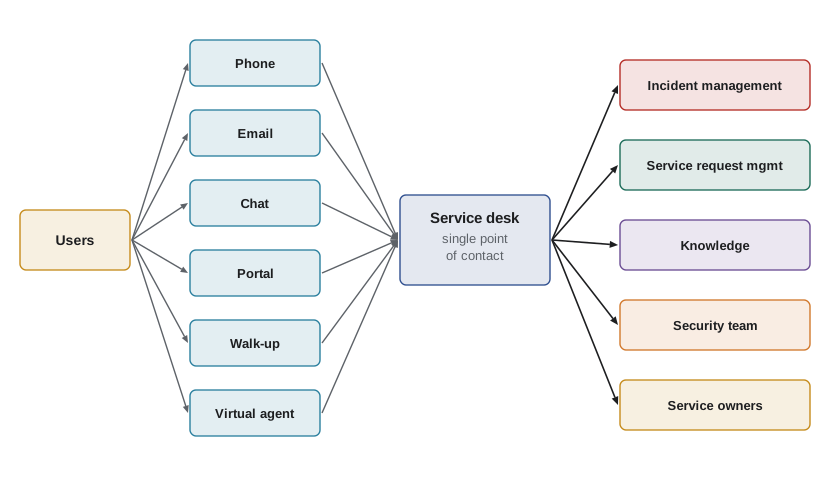
In plain words, the purpose of the service desk practice is to capture demand for incident resolution and service requests, and to act as the entry point and single point of contact for the service provider with all of its users. Two ideas are packed into that purpose. The first is capture: the service desk is where demand enters the support system, so it must record, classify and route that demand accurately. The second is single point of contact: users should not have to work out which internal team to call. They contact one recognized place, and the service desk takes responsibility for getting their need met.
Modern guidance stresses that the service desk is about empathy and understanding as much as technology. Users who contact support are often frustrated, under time pressure or anxious about a deadline. A service desk that solves the technical issue but leaves users feeling ignored has not delivered a good experience. ITIL describes the service desk as having a major influence on user experience and on how the provider is perceived.
What the service desk handles
Service desks typically handle several kinds of contact. Incidents are reports that something is not working or not working well. Service requests are requests for something predefined and routine: a password reset, access to an application, a new laptop or information. Questions and how-to queries are requests for information or advice. Feedback includes complaints and compliments. Some service desks also take the first report of security events, such as suspected phishing, and pass them to the security team according to a defined procedure.
Each type of contact is routed differently. Incidents go into incident management, requests into service request management, and security reports into the security process. Recording the type correctly at the start matters because it drives priority, targets and reporting. A request recorded as an incident will skew incident statistics and may be handled with unnecessary urgency; an incident recorded as a request may wait in a fulfilment queue while users remain unable to work.
| Contact type | Example | Routed to | Typical target |
|---|---|---|---|
| Incident | The finance application freezes when saving | Incident management | Restore within the priority target |
| Service request | Please give me access to the shared drive | Service request management | Fulfil within the catalogue target |
| Question | How do I set up an out-of-office reply? | Knowledge or service desk | Answer on first contact |
| Complaint or compliment | The new portal is confusing | Relationship or service owner | Acknowledge and respond |
| Security report | I clicked a link in a suspicious email | Information security procedure | Escalate immediately |
Channels
Users reach the service desk through many channels. Phone remains important for urgent issues and for users who prefer to talk. Email is convenient but slow and often incomplete. Chat and instant messaging give quick, written exchanges. Self-service portals let users log requests, check status and search knowledge without waiting. Walk-up counters, sometimes called tech bars, let users bring devices in person. Many organizations also use chatbots or virtual agents, now often powered by generative AI, to answer common questions and collect details before a human takes over.
An omnichannel approach means a contact can move between channels without losing context. A user might start in a chatbot, escalate to a live chat agent and then receive a callback, with the record following them throughout. Channel strategy should follow user needs. Pushing everyone into the cheapest channel can backfire if that channel cannot handle complex or sensitive issues. Accessibility also matters: some users rely on phone or text relay services, screen readers or plain-language interfaces.
| Channel | Strengths | Weaknesses | Best for |
|---|---|---|---|
| Phone | Immediate, personal, handles complexity | Expensive per contact, queues at peaks | Urgent incidents, distressed users |
| Asynchronous, leaves a written trail | Slow, often missing details | Non-urgent requests with attachments | |
| Chat | Fast, agents can handle two or three at once | Poor for very complex issues | Quick questions, guided fixes |
| Self-service portal | Available all day, cheapest per contact | Depends on good knowledge and design | Routine requests, status checks |
| Walk-up | Hands-on help with devices | Limited hours and locations | Hardware faults, new device setup |
| Virtual agent | Instant, scales easily | Can frustrate users if it cannot hand off | Common questions, triage |
Organizing the service desk
Service desks can be organized in several ways. A local service desk sits close to the users it serves, often in the same building, which suits organizations with hands-on support needs. A centralized service desk serves all users from one location, which improves consistency and efficiency. A virtual service desk uses tools to make agents in different locations appear as one desk to users. Follow-the-sun arrangements pass work between desks in different time zones so support is available around the clock without night shifts. Many organizations combine these approaches, for example a central desk with local walk-up counters.
Language and regulation shape the choice. A Canadian federal department may need agents who can serve the public in English and French. A provider serving Quebec must respect the Charter of the French Language, as amended in 2022, which strengthens the right to be served in French. In the United States, a desk serving a diverse population may offer service in Spanish and other languages, and agencies receiving federal funds have obligations to provide meaningful access to people with limited English proficiency. Data residency requirements, covered in ITIL-130, can also limit where agents may access user data from.
Worked problem
Coverage with follow-the-sun
A provider has desks in Halifax (UTC−3 in summer), Manila (UTC+8) and Lisbon (UTC+1 in summer). Each desk works 08:00 to 17:00 local time. Do the three desks together cover all 24 hours in UTC?
Show solution
- Halifax 08:00–17:00 local is 11:00–20:00 UTC.
- Manila 08:00–17:00 local is 00:00–09:00 UTC.
- Lisbon 08:00–17:00 local is 07:00–16:00 UTC.
- Combined: 00:00–09:00, 07:00–16:00 and 11:00–20:00 UTC cover 00:00–20:00. The gap is 20:00–24:00 UTC.
Answer: No. There is a four-hour gap from 20:00 to 24:00 UTC, which would need extended hours in Halifax or an on-call arrangement.
# Check UTC coverage for desks working local office hours (summer offsets)
desks = {"Halifax": -3, "Manila": 8, "Lisbon": 1}
start, end = 8, 17
covered = [[] for _ in range(24)]
for name, off in desks.items():
    for local in range(start, end):
        utc = (local - off) % 24
        covered[utc].append(name)
gaps = [h for h in range(24) if not covered[h]]
for h in range(24):
    print(f"{h:02d}:00 UTC  {', '.join(covered[h]) or '-- no desk --'}")
print("uncovered hours:", gaps)00:00 UTC Manila 01:00 UTC Manila 02:00 UTC Manila 03:00 UTC Manila 04:00 UTC Manila 05:00 UTC Manila 06:00 UTC Manila 07:00 UTC Manila, Lisbon 08:00 UTC Manila, Lisbon 09:00 UTC Lisbon 10:00 UTC Lisbon 11:00 UTC Halifax, Lisbon 12:00 UTC Halifax, Lisbon 13:00 UTC Halifax, Lisbon 14:00 UTC Halifax, Lisbon 15:00 UTC Halifax, Lisbon 16:00 UTC Halifax 17:00 UTC Halifax 18:00 UTC Halifax 19:00 UTC Halifax 20:00 UTC -- no desk -- 21:00 UTC -- no desk -- 22:00 UTC -- no desk -- 23:00 UTC -- no desk -- uncovered hours: [20, 21, 22, 23]
Staffing the service desk
Staffing is one of the hardest service desk decisions. Too few agents and users wait in long queues; too many and money is wasted. Because contacts arrive at random and take varying times to handle, simple averages mislead. BUS-230 introduced the Erlang C model for staffing queues with several servers, and service desks use it widely. Lesson 11 returns to it in detail. Here the key points are that waiting time rises steeply as agents become busier, that demand varies by hour and day, and that staffing must allow for shrinkage: time agents are paid but unavailable because of breaks, training, meetings, illness and leave.
Worked problem
Allowing for shrinkage
A forecast says 12 agents must be on the phones between 09:00 and 10:00 on Mondays to meet the service level target. The desk's shrinkage is 30 %. How many agents must be scheduled?
Show solution
- Shrinkage means only 70 % of scheduled time is available for contacts.
- Scheduled agents = required agents ÷ (1 − shrinkage) = 12 ÷ 0.70 ≈ 17.1.
- Round up to 18 agents scheduled.
Answer: Schedule 18 agents to have about 12 available to take contacts.
Skills and roles
Service desk agents need a mix of technical knowledge and people skills. Technical skills include understanding the services and common faults, using diagnostic scripts and tools, and knowing when to escalate. People skills include active listening, empathy, clear explanation without jargon, patience with frustrated users and the ability to manage expectations honestly. Business awareness matters too: knowing which services are critical at month-end or which users run time-sensitive operations helps agents judge urgency.
Typical roles include service desk agents (often called analysts), team leaders, a service desk manager, knowledge coordinators, and workforce planners who forecast demand and build schedules. Some desks have tiered levels within the desk itself, with senior agents handling harder contacts. Others use a single level with fast access to specialists. Lesson 4 discusses swarming, an alternative to rigid tiers.
| Skill area | Examples | How to develop it |
|---|---|---|
| Technical | Common fault patterns, tool use, diagnostics | Product training, shadowing resolver teams, knowledge articles |
| Communication | Active listening, plain language, written clarity | Call reviews, coaching, writing guidelines |
| Emotional intelligence | Empathy, staying calm, de-escalation | Role play, peer support, recognition |
| Business awareness | Critical periods, key users, service impact | Briefings from service owners, business calendars |
| Accessibility awareness | Relay services, assistive technology, plain language | Training on accessibility and inclusive service |
Recording contacts well
Every contact should be recorded with enough information for someone else to continue the work. A good record captures who the user is, which service and configuration item are affected, what the symptoms are, what has been tried, the impact on the user and the business, and the classification and priority. Records feed every downstream practice: incident management uses them to resolve, problem management to spot trends, service level management to report and continual improvement to find opportunities.
Poor records are one of the most common causes of weak support. A ticket that says only "email broken" forces the next person to call the user back, wastes time and frustrates everyone. Templates, mandatory fields for key data and guided scripts help, but the best safeguard is a culture where agents understand why records matter.
Measuring the service desk
Service desk metrics fall into three groups. Efficiency metrics include average speed of answer, abandonment rate, average handling time and cost per contact. Effectiveness metrics include first contact resolution (the share of contacts resolved without escalation or a follow-up contact) and the share resolved at the service desk. Experience metrics include user satisfaction scores after contact and broader measures such as experience level agreements, discussed in lesson 11.
Each metric can mislead on its own. Pushing average handling time down can encourage agents to rush and close tickets prematurely, which lowers first contact resolution and generates repeat contacts. Pushing first contact resolution up can encourage agents to spend too long on complex issues that should be escalated. A balanced set of metrics, reviewed together and interpreted in context, gives a truer picture.
Worked problem
Computing service desk metrics
In one week a service desk receives 2,400 phone contacts. 120 callers hang up before being answered. Of the 2,280 answered, 1,596 are resolved during the first contact, 456 are escalated and 228 lead to a follow-up contact from the user about the same issue. Calculate the abandonment rate and the first contact resolution rate.
Show solution
- Abandonment rate = abandoned ÷ offered = 120 ÷ 2,400 = 5 %.
- First contact resolution = resolved at first contact ÷ answered = 1,596 ÷ 2,280 = 70 %.
- The 228 repeat contacts suggest some contacts recorded as resolved were not truly resolved; checking a sample would test this.
Answer: Abandonment is 5 % and first contact resolution is 70 %, with repeat contacts worth investigating.
The changing service desk
Service desks are changing quickly. Self-service portals and virtual agents absorb routine work, so human agents increasingly handle the complex, ambiguous and emotional cases. Automation can reset passwords, unlock accounts, provision standard software and gather diagnostic information before an agent is involved. Generative AI tools can draft responses, summarize long ticket histories and suggest knowledge articles. These tools can raise productivity, but they also raise questions about accuracy, privacy and the user experience, which ITIL-150 examines in depth.
As routine work disappears, the skill profile of the service desk rises. Organizations that treat the service desk as a low-skill entry job often struggle with this shift; those that invest in training, career paths and recognition tend to retain experienced agents who resolve more on first contact. The service desk can also become a strategic listening post, feeding user insight to service owners and product teams.
Connections to other practices
The service desk sits at the front of most support value streams. It hands incidents to incident management and requests to service request management, consumes knowledge from knowledge management, relies on service level management for targets, feeds problem management with trend data and informs relationship management about user sentiment. When a major incident occurs, the service desk handles the surge of contacts and communicates status. When a change is deployed, the service desk needs advance notice so agents can recognize related contacts.
A frequent failure pattern is a service desk that is cut off from the rest of the organization: it learns about outages from users, about releases after they happen and about known errors only by accident. Integrating the service desk into change, release and problem communication is one of the cheapest improvements a provider can make.
Common mistakes
MistakeTreating the service desk as a call-logging function.
InsteadThe service desk resolves, routes and communicates; it is the user's single point of contact and shapes the experience.
MistakeRecording every contact as an incident.
InsteadClassify contacts as incidents, requests, questions, feedback or security reports so each goes to the right practice.
MistakeForcing all users into the cheapest channel.
InsteadOffer a balanced channel mix that meets user needs, including accessibility needs.
MistakeStaffing to the average without allowing for peaks and shrinkage.
InsteadForecast by interval, use queueing models and divide by available time after shrinkage.
MistakeManaging to one metric such as average handling time.
InsteadBalance efficiency, effectiveness and experience metrics.
Summary and key terms
- The service desk captures demand for incident resolution and service requests and is the single point of contact for users.
- It handles incidents, requests, questions, feedback and first reports of security events, routing each correctly.
- Phone, email, chat, portals, walk-up and virtual agents each suit different needs.
- Local, centralized, virtual and follow-the-sun models can be combined; language and data rules affect the design.
- Staffing must reflect variable demand, queueing behaviour and shrinkage.
- Agents need technical, interpersonal and business skills, and good records feed every other practice.
- Balanced metrics and integration with change, problem and knowledge keep the service desk effective.
- Service desk
- The point of communication between the service provider and all of its users.
- Single point of contact
- One recognized entry point for all user support needs.
- Omnichannel
- Support across many channels where context follows the user from one channel to another.
- Virtual service desk
- Agents in several locations working as one desk through shared tools.
- Follow-the-sun
- Passing support between desks in different time zones to provide round-the-clock cover.
- Shrinkage
- The share of scheduled agent time not available for handling contacts.
- First contact resolution
- The share of contacts resolved without escalation or a repeat contact.
- Abandonment rate
- The share of contacts in which the user gives up before being answered.
- Average speed of answer
- The average time users wait before an agent responds.
- Virtual agent
- An automated conversational assistant that answers questions or gathers details.
Practice problems
Work each problem on paper first, then reveal the answer to check.
State the purpose of the service desk practice in plain words.
Show answer
To capture demand for incident resolution and service requests and act as the single point of contact for all users.
A user asks for access to a project folder. How should the service desk classify this?
Show answer
As a service request, routed to service request management.
Give one strength and one weakness of email as a support channel.
Show answer
Strength: asynchronous with a written trail. Weakness: slow and often missing details.
Ten agents are needed on the phones and shrinkage is 35 %. How many should be scheduled?
Show answer
10 ÷ 0.65 ≈ 15.4, so 16.
Out of 1,800 answered contacts, 1,170 are resolved at first contact. What is the first contact resolution rate?
Show answer
1,170 ÷ 1,800 = 65 %.
Why can pushing average handling time down harm users?
Show answer
Agents may rush or close tickets prematurely, causing repeat contacts and lower resolution.
What is follow-the-sun support?
Show answer
Passing work between desks in different time zones so support is available around the clock.
Name two things a good contact record should include.
Show answer
Any two of: user, affected service or configuration item, symptoms, steps tried, impact, classification and priority.
Why should the service desk be told about changes before they are deployed?
Show answer
So agents can recognize related contacts quickly and give accurate information.
How is automation changing the service desk skill profile?
Show answer
Routine work is automated, so human agents handle more complex and emotional cases and need deeper skills.
Lesson quiz · 5 questions
Score 60% or more to complete this lesson.
Create a free account to save your progress, take quizzes and earn a certificate.