
ITIL-140 · Lesson 8 of 12 · 29 min
Change enablement II: scheduling, DevOps and measuring change
Lesson 7 covered how changes are classified, authorized and risk-assessed. This lesson covers the rest of change enablement: managing the change schedule, coordinating changes that could interfere with each other, communicating changes, reviewing their outcomes, and measuring how well the practice works. It also looks at how change enablement operates in organizations that deploy software many times a day through automated pipelines.
The change schedule
The change schedule, often called the change calendar, lists planned changes and when they will happen. ITIL describes it as being used to help plan changes, assist in communication, avoid conflicts and assign resources. It can also be used after the fact to provide information for incident management, problem management and improvement planning. A good schedule is visible to everyone who needs it: the service desk, resolver teams, service owners and, for changes users will notice, the users themselves.
Schedules usually include several kinds of information: approved changes with their implementation windows; maintenance windows agreed with customers when changes with downtime may be made; blackout or freeze periods when non-essential changes are avoided, such as month-end close, tax season, Black Friday or a major sporting event a broadcaster is covering; and business events that raise the impact of any failure, such as a product launch.
| Schedule element | Purpose | Example |
|---|---|---|
| Change window | When a specific change will be made | Saturday 22:00–02:00 for the database upgrade |
| Maintenance window | Agreed time when planned downtime is acceptable | Sundays 01:00–05:00 for the customer portal |
| Freeze or blackout period | Time when non-essential changes are avoided | Last three business days of each quarter |
| Business event | Period of high impact for failures | Year-end payroll run; benefits sign-up period |
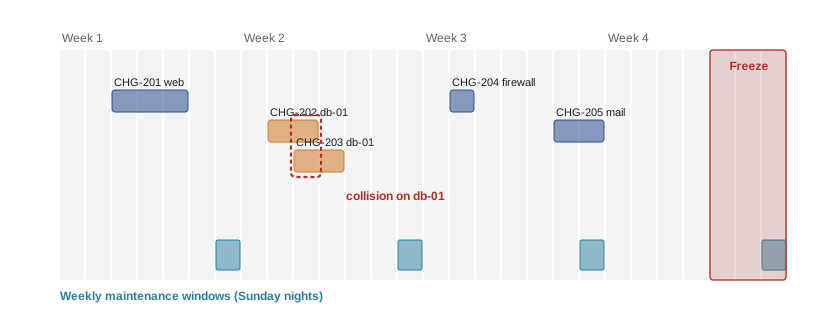
Detecting collisions
Two changes collide when they affect the same or dependent components at overlapping times. Collisions make failures more likely and make diagnosis harder: if two changes go in together and something breaks, which one caused it? Change enablement checks new changes against the schedule and against the configuration data that shows dependencies. Many tools flag collisions automatically when changes share configuration items or fall in freeze periods.
The program below checks a small schedule for two kinds of conflict: changes that touch the same configuration item at overlapping times, and changes planned during a freeze period. Real tools also consider dependencies between configuration items, such as a database used by several applications.
from datetime import datetime as dt

changes = [
    ("CHG-101", "db-cust-01", dt(2026, 11, 7, 22, 0), dt(2026, 11, 8, 1, 0)),
    ("CHG-102", "web-portal", dt(2026, 11, 7, 23, 0), dt(2026, 11, 8, 0, 0)),
    ("CHG-103", "db-cust-01", dt(2026, 11, 8, 0, 30), dt(2026, 11, 8, 2, 0)),
    ("CHG-104", "payroll-app", dt(2026, 11, 27, 20, 0), dt(2026, 11, 27, 22, 0)),
    ("CHG-105", "firewall-edge", dt(2026, 11, 14, 22, 0), dt(2026, 11, 14, 23, 0)),
]
freezes = [("month-end close", dt(2026, 11, 26, 0, 0), dt(2026, 11, 30, 23, 59))]

def overlap(a1, a2, b1, b2):
    return a1 < b2 and b1 < a2

issues = []
for i, (c1, ci1, s1, e1) in enumerate(changes):
    for c2, ci2, s2, e2 in changes[i + 1:]:
        if ci1 == ci2 and overlap(s1, e1, s2, e2):
            issues.append(f"collision: {c1} and {c2} both change {ci1}")
    for name, fs, fe in freezes:
        if overlap(s1, e1, fs, fe):
            issues.append(f"freeze: {c1} on {ci1} falls in {name}")
for line in issues or ["no conflicts"]:
    print(line)
print(f"{len(changes)} changes checked, {len(issues)} issues found")collision: CHG-101 and CHG-103 both change db-cust-01 freeze: CHG-104 on payroll-app falls in month-end close 5 changes checked, 2 issues found
The check finds that two changes to the same customer database overlap after midnight and that a payroll change falls in the month-end freeze. Change enablement would ask the teams to sequence the database changes, or combine them into one tested change, and to move the payroll change or justify it as essential.
Communicating changes
A change that surprises people causes trouble even when it works. Users may think an intended new screen is a fault and call the service desk. Resolver teams may waste time diagnosing an incident that a known change explains. Communication planning is therefore part of change enablement: deciding who needs to know about a change, what they need to know, when and through which channel. For user-visible changes, that may mean announcements, training and updated knowledge articles. For internal changes, it may mean a note in the operations channel and an entry on the schedule that the service desk can see.
Worked problem
Who needs to know?
A team plans to change the login page of the staff portal to add multifactor authentication prompts on 3 November. List who needs to know and what.
Show solution
- All staff: what will change, when, what they need to do (register a device), where to get help.
- Service desk: the date, the expected questions, a knowledge article with steps and known issues, and an escalation contact.
- Managers of shift workers and staff without company phones: alternative authentication options.
- Accessibility contacts: how the prompts work with screen readers and other assistive technologies.
- Information security: confirmation of go-live and monitoring for unusual lockouts.
Answer: Communicating with staff, the service desk, managers, accessibility contacts and security turns a potential flood of confused contacts into a smooth change.
Reviewing changes
After implementation, changes should be reviewed to confirm that they achieved their objectives and caused no unexpected side effects. For standard changes, review may be automatic: the tool checks that monitoring shows healthy services afterwards. For significant normal changes and all emergency changes, a short post-implementation review asks whether the change met its goals, whether any incidents followed, whether the plan was followed and what could be done better. Failed changes deserve the same blameless analysis as major incidents, because they reveal weaknesses in testing, planning or design.
Change enablement in DevOps and continuous delivery
Organizations practising DevOps and continuous delivery may deploy changes dozens or hundreds of times a day. A weekly approval meeting cannot keep pace. Instead, change enablement is built into the pipeline. Every change goes through version control, automated build and tests, security scans and peer review before it can be deployed. Deployment strategies such as feature flags, blue-green deployments and canary releases limit the impact if something goes wrong. Monitoring and automated rollback detect and reverse failures quickly.
In this model, most changes are effectively standard or low-risk normal changes whose authorization is the peer review and passing pipeline. The pipeline itself is the change model; changing the pipeline is a change that needs assessment. Human change authorities focus on the minority of changes that the pipeline cannot assess, such as data migrations, architecture changes and changes with commercial or regulatory implications. This approach is consistent with ITIL 4, which explicitly supports decentralized authority and automation.
| Pipeline control | Risk it reduces |
|---|---|
| Version control with peer review | Unreviewed or untraceable changes |
| Automated unit, integration and security tests | Defects and known vulnerabilities reaching production |
| Infrastructure as code | Configuration drift and manual errors |
| Feature flags | Exposing unfinished features; allows instant switch-off |
| Canary or progressive release | A fault affecting all users at once |
| Automated monitoring and rollback | Long outages after a bad deployment |
Worked problem
Canary release arithmetic
A team releases a new version to 5 % of 200,000 users first. Monitoring watches the error rate for 30 minutes before expanding. If the new version has a defect that makes 2 % of requests fail, and an average user makes 20 requests in 30 minutes, how many failed requests occur during the canary, compared with releasing to everyone at once?
Show solution
- Canary users: 5 % × 200,000 = 10,000 users.
- Requests in 30 minutes: 10,000 × 20 = 200,000; failures: 2 % = 4,000.
- Full release: 200,000 users × 20 = 4,000,000 requests; failures: 80,000.
- The canary limits failures to one-twentieth while still detecting the defect.
Answer: About 4,000 failed requests during the canary versus about 80,000 with a full release, before automated rollback.
Measuring change enablement
Good measurement balances speed and safety. The DevOps Research and Assessment (DORA) research program popularized four key metrics, two for throughput and two for stability: deployment frequency, lead time for changes (from code committed to running in production), change failure rate (the share of deployments that cause a failure in production needing remediation) and time to restore service after a failure. Later DORA reports added reliability and refined the definitions, but the four core measures remain widely used. CMPUT-301 discusses them from the software engineering side.
Traditional ITIL measures complement these: change success rate (the share of changes implemented as planned without causing incidents), the share of emergency changes, the share of changes that are standard, the time changes wait for authorization, and the number of unauthorized changes detected. Together these show whether change enablement is enabling flow while controlling risk.
| Metric | What it shows | Healthy direction |
|---|---|---|
| Deployment frequency | How often changes reach production | Higher, if stability holds |
| Lead time for changes | How quickly changes flow | Shorter |
| Change failure rate | Share of changes causing failures | Lower |
| Time to restore after a failed change | How quickly failures are fixed | Shorter |
| Share of emergency changes | Planning quality and process bypass | Low and stable |
| Share of standard changes | How much routine change flows without waiting | Higher, for suitable work |
| Authorization wait time | Delay added by approvals | Shorter |
The program below computes these measures for a synthetic quarter of change records generated with a fixed random seed. It shows how simple calculations over change data reveal patterns, such as emergency changes failing more often than standard ones.
import random, statistics
random.seed(8)

FAIL_P = {"standard": 0.01, "normal": 0.06, "emergency": 0.18}
MIX = ["standard"] * 62 + ["normal"] * 33 + ["emergency"] * 5    # percentage mix
changes = []
for _ in range(600):                                         # one quarter
    kind = random.choice(MIX)
    failed = random.random() < FAIL_P[kind]
    wait_h = 0 if kind == "standard" else (random.uniform(4, 96) if kind == "normal" else random.uniform(0.2, 2))
    restore_min = random.lognormvariate(3.4, 0.7) if failed else None
    changes.append((kind, failed, wait_h, restore_min))

n = len(changes)
fails = [c for c in changes if c[1]]
print(f"changes in quarter: {n}  (about {n/13:.0f} per week)")
print(f"change failure rate: {len(fails)/n:.1%}   change success rate: {1-len(fails)/n:.1%}")
for kind in ("standard", "normal", "emergency"):
    sub = [c for c in changes if c[0] == kind]
    f = sum(c[1] for c in sub)
    print(f"  {kind:9} {len(sub):>4} changes  {len(sub)/n:6.1%} of total  failure rate {f/len(sub):6.1%}")
waits = [c[2] for c in changes if c[0] == "normal"]
print(f"median authorization wait for normal changes: {statistics.median(waits):.0f} h")
print(f"median time to restore after a failed change: {statistics.median(c[3] for c in fails):.0f} min")changes in quarter: 600 (about 46 per week) change failure rate: 4.7% change success rate: 95.3% standard 362 changes 60.3% of total failure rate 1.1% normal 213 changes 35.5% of total failure rate 8.5% emergency 25 changes 4.2% of total failure rate 24.0% median authorization wait for normal changes: 55 h median time to restore after a failed change: 31 min
Several actions follow from such a report. If normal changes wait a median of two days for authorization, decentralizing low-risk approvals would shorten lead time. If emergency changes fail far more often than others, the organization should look at why so many changes are urgent and whether emergency changes get enough testing. If standard changes rarely fail, more change types may be candidates for the standard category.
Unauthorized changes
An unauthorized change is one made without following the agreed path. Unauthorized changes are a common cause of incidents and a frequent audit finding. They are detected by comparing actual configurations with expected ones, for example through configuration monitoring that alerts when a server's settings change, or by reconciling deployment logs with change records. When an unauthorized change is found, the response should be proportionate: understand why it happened, restore the expected state if needed, and fix the cause, which is often that the authorized path was too slow or unclear. Making the right path the easy path is the best prevention.
Bringing it together
Change enablement works best when it is risk-based, automated where possible and integrated with other practices. It relies on service configuration management for impact analysis, release and deployment management for implementation, incident management and monitoring for detecting failures, problem management for fixes, service level management for agreed windows and relationship management for communicating with customers. Its success is visible not in the number of meetings held or forms completed, but in a steady flow of changes that deliver value without hurting users.
Common mistakes
MistakeKeeping the change schedule hidden from the service desk and users.
InsteadPublish the schedule to everyone who needs it, including the service desk and users for visible changes.
MistakeImplementing several changes to the same component at once.
InsteadDetect collisions and sequence or combine changes so failures can be diagnosed.
MistakeApplying weekly approval meetings to teams that deploy many times a day.
InsteadBuild controls into the pipeline and reserve human authorities for changes the pipeline cannot assess.
MistakeMeasuring only how many changes were approved.
InsteadBalance throughput (frequency, lead time) with stability (failure rate, time to restore).
MistakePunishing teams for unauthorized changes without asking why they happened.
InsteadFind the cause, often a slow or unclear path, and make the right path the easy one.
Summary and key terms
- The change schedule plans changes, supports communication, avoids conflicts and informs incident and problem management.
- Schedules show change windows, maintenance windows, freeze periods and high-impact business events.
- Collision detection prevents overlapping changes to the same or dependent components.
- Communication and post-implementation review are part of change enablement.
- In DevOps, pipeline controls such as automated tests, peer review, canaries and rollback provide much of the assurance.
- DORA metrics and traditional measures together balance speed and safety.
- Unauthorized changes are best prevented by making the authorized path easy.
- Change schedule
- A calendar of planned and past changes used for planning, communication and conflict avoidance.
- Maintenance window
- An agreed period when planned changes with downtime may be made.
- Change freeze
- A period when non-essential changes are avoided because of high business impact.
- Collision
- Two or more changes affecting the same or dependent components at overlapping times.
- Post-implementation review
- A review after a change to confirm its outcome and learn lessons.
- Canary release
- Releasing a change to a small share of users first to detect problems before full rollout.
- Feature flag
- A switch that turns a feature on or off without redeploying code.
- Change failure rate
- The share of changes that cause a failure in production requiring remediation.
- Lead time for changes
- The time from a change being committed to it running in production.
- Unauthorized change
- A change made without following the agreed authorization path.
Practice problems
Work each problem on paper first, then reveal the answer to check.
Give three uses of the change schedule.
Show answer
Planning changes, communicating them, avoiding conflicts and assigning resources (any three).
What is a change freeze, and give an example.
Show answer
A period when non-essential changes are avoided, such as quarter-end close or Black Friday.
Why are overlapping changes to the same component risky?
Show answer
They raise the chance of failure and make it hard to tell which change caused a problem.
Who should be told about a change to a login page used by all staff?
Show answer
All staff, the service desk, managers of affected groups, accessibility contacts and security.
Name the four core DORA metrics.
Show answer
Deployment frequency, lead time for changes, change failure rate and time to restore service.
Of 400 changes, 18 caused incidents. What is the change failure rate?
Show answer
18 ÷ 400 = 4.5 %.
A canary covers 2 % of 50,000 users. How many users see a defect during the canary?
Show answer
1,000.
How does change enablement work in a continuous delivery pipeline?
Show answer
Automated tests, peer review, deployment strategies and monitoring provide assurance; humans review only changes the pipeline cannot assess.
What should happen when an unauthorized change is discovered?
Show answer
Understand why, restore the expected state if needed, and fix the cause, often by making the right path easier.
Why track the share of emergency changes?
Show answer
A high share suggests poor planning or bypassing of normal assessment, and emergency changes often fail more.
Lesson quiz · 5 questions
Score 60% or more to complete this lesson.
Create a free account to save your progress, take quizzes and earn a certificate.